

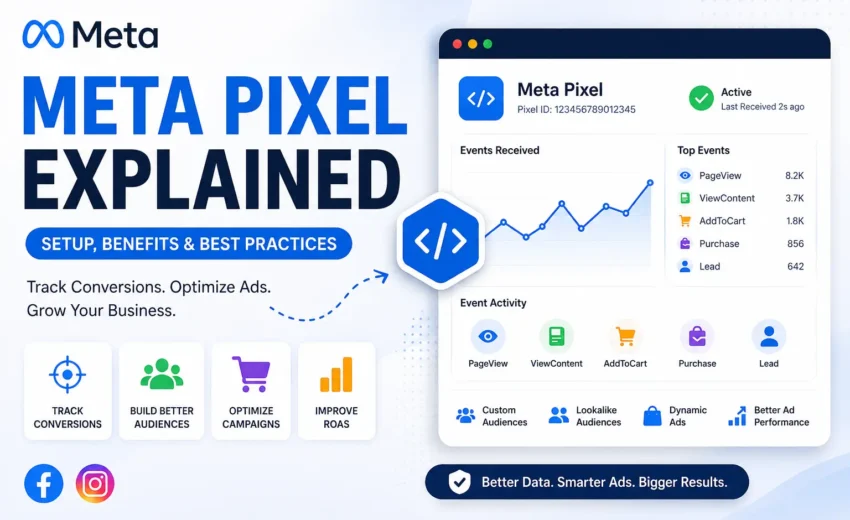
Running Facebook and Instagram ads without measuring what happens after someone clicks your advertisement can make it difficult to understand whether your marketing budget is delivering real business results. While clicks and impressions indicate interest, they don’t tell you whether visitors completed valuable actions such as making a purchase, submitting a contact form, or booking a service.
That’s where Meta Pixel comes in.
Meta Pixel is a browser-based tracking tool that helps businesses measure website activity, attribute conversions to Meta Ads, create high-value audiences, and optimize campaigns using real customer interactions. Whether you operate an eCommerce store, a hotel booking website, a SaaS platform, or a local service business, Meta Pixel provides the data needed to make informed advertising decisions.
Today, accurate conversion measurement is more important than ever. Browser privacy technologies such as Apple’s Intelligent Tracking Prevention (ITP), Firefox Enhanced Tracking Protection (ETP), App Tracking Transparency (ATT), and ad blockers can reduce browser-based tracking accuracy. To overcome these limitations, many businesses now use Meta Pixel together with Meta Conversions API (CAPI) to improve data reliability and campaign optimization.
In this guide, you’ll learn what Meta Pixel is, how it works, the different types of events it tracks, how to install it correctly, and the best practices for maximizing your advertising performance.
Key Takeaways
- Meta Pixel is a JavaScript tracking code that records visitor actions on your website.
- It helps measure conversions from Facebook and Instagram advertising campaigns.
- Meta Pixel supports Standard Events, Custom Events, and Custom Conversions.
- Businesses can create Custom Audiences and Lookalike Audiences using Pixel data.
- Meta recommends using Meta Pixel with Conversions API (CAPI) for more reliable measurement.
- Proper event tracking improves campaign optimization, attribution, and Return on Ad Spend (ROAS).
- Regular testing using Meta Events Manager and Test Events helps ensure accurate tracking.
What Is Meta Pixel?
Meta Pixel (formerly called Facebook Pixel) is a JavaScript code snippet provided by Meta that you install on your website to measure visitor interactions after they engage with your Facebook or Instagram ads.
Once installed, the Pixel records specific user actions—known as events—such as viewing a product page, adding an item to a shopping cart, submitting a lead form, completing a purchase, or registering for an account. These events are sent to Meta Events Manager, where advertisers can analyze campaign performance, create audiences, and optimize advertising.
Unlike traditional web analytics tools that primarily measure website traffic, Meta Pixel connects website activity directly to advertising performance. This helps businesses identify which campaigns, ads, and audiences generate valuable conversions instead of simply driving visitors.
For example:
- An online fashion store can track product views, cart additions, and completed purchases.
- A hotel can measure room enquiry forms, booking requests, and appointment scheduling.
- A real estate agency can monitor property enquiry submissions.
- A software company can track free-trial registrations and demo requests.
This conversion data allows Meta’s advertising system to better understand customer behavior and improve future ad delivery.
Why Is Meta Pixel Important?
Installing Meta Pixel before launching advertising campaigns gives Meta the data it needs to optimize delivery, measure performance, and improve campaign efficiency.
1. Measures Meaningful Conversions
Rather than focusing only on clicks, Meta Pixel tracks business outcomes such as:
- Purchases
- Lead form submissions
- Contact enquiries
- Account registrations
- Appointment scheduling
- Newsletter sign-ups
- Product enquiries
These actions provide a more accurate picture of campaign success.
2. Improves Campaign Optimization
Meta’s advertising platform uses machine learning to identify users who are more likely to complete your selected conversion event.
As your Pixel collects more high-quality conversion data, Meta improves campaign delivery by showing advertisements to users with similar characteristics and online behaviour.
This often results in:
- Better lead quality
- Higher conversion rates
- Lower Cost Per Acquisition (CPA)
- Improved Return on Ad Spend (ROAS)
3. Creates Powerful Remarketing Audiences
Meta Pixel automatically records visitor behaviour, allowing advertisers to build Custom Audiences for remarketing.
For example, you can target visitors who:
- Viewed a specific product
- Added products to their cart
- Started checkout but didn’t complete payment
- Visited your pricing page
- Read selected blog articles
- Submitted a lead form
Since these users have already interacted with your business, remarketing campaigns typically achieve higher conversion rates than campaigns targeting cold audiences.
4. Builds Lookalike Audiences
After collecting enough conversion data, Meta can create Lookalike Audiences.
These audiences consist of people whose behaviours and interests resemble those of your existing customers.
Instead of guessing who might be interested in your business, Meta uses conversion data to identify similar users who are more likely to convert.
5. Supports Smarter Advertising Decisions
Meta Pixel provides detailed reporting inside Meta Ads Manager and Meta Events Manager.
Advertisers can monitor:
- Conversion volume
- Purchase value
- Cost per conversion
- Event Match Quality
- Return on Ad Spend (ROAS)
- Attribution performance
These insights help businesses make data-driven decisions instead of relying on assumptions.
How Does Meta Pixel Work?
Meta Pixel works by recording visitor actions in the browser and sending those events to Meta’s advertising platform.
A simplified workflow looks like this:
Step 1: A Visitor Clicks Your Advertisement
A user clicks your Facebook or Instagram advertisement and lands on your website.
Step 2: The Meta Pixel Loads
When the webpage loads, the Meta Pixel code runs inside the visitor’s browser.
Step 3: User Actions Are Recorded
The Pixel records predefined actions called events, including:
- PageView
- ViewContent
- Search
- AddToCart
- InitiateCheckout
- Purchase
- Lead
- CompleteRegistration
- Contact
For example, the Search event tracks internal searches performed on your website, such as a visitor searching for “Kerala houseboat” or “Deluxe Room” using your website’s search feature. It does not track searches performed on Google or other search engines.
Step 4: Event Data Is Sent to Meta
The recorded events are transmitted to Meta Events Manager, where they become available for reporting, audience creation, attribution, and campaign optimization.
Step 5: Campaign Optimization Begins
Meta combines your event data with auction signals, campaign objectives, and machine learning models to identify users who are more likely to complete your desired conversion action.
As more reliable conversion data is collected, campaign performance generally improves because Meta can optimize ad delivery more effectively.
Browser Tracking vs. Server-side Tracking
Traditionally, Meta Pixel relies on browser-based tracking to measure visitor activity. However, browser privacy features, ad blockers, and Apple’s App Tracking Transparency (ATT) framework can prevent some browser events from being recorded.
To improve measurement accuracy, Meta recommends using Meta Conversions API (CAPI) alongside Meta Pixel. While the Pixel records browser events, Conversions API sends server-side events directly to Meta, helping recover conversions that might otherwise be missed.
Using both technologies together provides more complete reporting, stronger attribution, and better optimization signals for Meta’s advertising system.
Meta Pixel Events
At the core of Meta Pixel are events—specific actions visitors perform on your website. Every time someone interacts with your site after clicking a Facebook or Instagram ad, Meta Pixel records these actions and sends them to Meta Events Manager. This data helps advertisers measure conversions, build audiences, optimize campaigns, and understand how users move through the customer journey.
Meta Pixel supports Standard Events, Custom Events, and Custom Conversions, allowing businesses to track both common and unique interactions.
Standard Events
Standard Events are predefined actions recognized by Meta. Since they follow Meta’s recommended naming conventions, they integrate seamlessly with Meta Ads Manager, enabling accurate reporting, audience creation, and AI-powered campaign optimization.
Some of the most commonly used Standard Events include:
Standard Event | Purpose |
PageView | Automatically records when a page loads. |
ViewContent | Tracks visits to important product or service pages. |
Search | Records internal searches performed on your website, not searches on Google or other search engines. |
AddToCart | Tracks products added to the shopping cart. |
AddToWishlist | Records products saved for later. |
InitiateCheckout | Measures when visitors begin the checkout process. |
AddPaymentInfo | Tracks when payment details are entered. |
Purchase | Records completed purchases and transaction values. |
Lead | Measures enquiries, contact form submissions, or qualified leads. |
CompleteRegistration | Tracks completed account registrations or similar high-intent sign-ups. |
Contact | Measures interactions such as contact form submissions or enquiries. |
Schedule | Records appointment or booking requests, making it suitable for businesses such as hotels, clinics, or service providers. |
Using Standard Events whenever possible gives Meta’s machine learning more consistent signals, improving campaign optimization and reporting.
Custom Events
Not every website follows the same customer journey. If your business tracks actions that Standard Events don’t cover, you can create Custom Events.
Examples include:
- Downloading an eBook or brochure
- Watching 75% of a promotional video
- Requesting a product demo
- Using a pricing calculator
- Starting a live chat
- Downloading a coupon
- Registering for a webinar
Custom Events allow businesses to measure actions that are unique to their marketing objectives.
Custom Conversions
Custom Conversions are created within Meta Events Manager using existing events and URL rules. They allow businesses to measure specific goals without adding additional code to their website.
Examples include:
- Thank-you pages after lead form submissions
- Hotel booking confirmation pages
- Order confirmation pages
- Membership activation pages
- Quote request confirmation pages
For example, a hotel website can create a Custom Conversion based on the booking confirmation URL to accurately measure completed reservations.
How to Set Up Meta Pixel
Setting up Meta Pixel correctly ensures accurate conversion tracking and better campaign optimization.
Step 1: Create a Meta Pixel
Open Meta Business Suite, navigate to Events Manager, and create a new Meta Pixel. Assign it to the appropriate business account and website.
Step 2: Install the Pixel
Meta Pixel can be installed in several ways:
- Manually by adding the Pixel code to your website’s <head> section.
- Using Google Tag Manager (GTM).
- Through partner integrations for WordPress, Shopify, WooCommerce, Wix, or Squarespace.
For most businesses, partner integrations or Google Tag Manager offer the easiest implementation and simplify future updates.
Step 3: Configure Events
Configure events based on your business objectives.
eCommerce
- ViewContent
- AddToCart
- InitiateCheckout
- Purchase
Lead Generation
- Lead
- Contact
- CompleteRegistration (for account creation or similar high-intent registrations)
Hotels & Travel
- ViewContent
- Contact
- Schedule (appointment or booking request)
- Custom Conversion for the booking confirmation page
Tracking the complete customer journey—not just purchases—provides Meta with richer optimization signals.
Step 4: Verify the Pixel
Before launching campaigns, verify that events are working correctly using:
- Meta Events Manager
- Test Events
- Meta Pixel Helper (Chrome extension)
Testing helps identify duplicate events, missing events, or incorrect configurations before they impact campaign reporting.
Event Match Quality
One important metric available in Meta Events Manager is Event Match Quality.
Event Match Quality indicates how effectively Meta can match your website events to real user accounts. Higher match quality improves attribution accuracy, audience creation, and campaign optimization.
You can improve Event Match Quality by:
- Enabling Automatic Advanced Matching
- Collecting customer information with appropriate user consent
- Using Meta Pixel together with Conversions API
- Testing events regularly after website updates
Best Practices
To maximize Meta Pixel’s effectiveness:
- Install the Pixel before launching any advertising campaigns.
- Track meaningful conversion events across the customer journey.
- Use Standard Events wherever possible.
- Enable Automatic Advanced Matching where supported.
- Test events after every website or tag update.
- Monitor Event Match Quality in Events Manager.
- Combine Meta Pixel with Conversions API for more reliable measurement.
- Obtain appropriate user consent and comply with privacy regulations applicable to your audience.
Practical Tip: Before launching a campaign, always verify that your key conversion events—such as Lead, Purchase, or Schedule—are firing correctly in the Test Events tool. Even a minor website update or plugin change can interrupt tracking without any obvious warning.
Meta Pixel vs. Meta Conversions API
Although both tools measure conversions, they collect data differently.
| Feature | Meta Pixel | Meta Conversions API |
|---|---|---|
| Tracking Method | Browser-based | Server-side |
| Implementation | Easy | Easy through partner integrations or advanced for custom server-side implementations |
| Browser Restrictions | More affected | Less affected |
| Data Accuracy | Good | Higher when combined with Pixel |
| Best Practice | Website tracking | Used alongside Meta Pixel |
Rather than replacing Meta Pixel, Conversions API complements it by sending events directly from your server to Meta. Together, they reduce data loss caused by browser privacy features, ad blockers, and tracking restrictions while improving attribution and campaign optimization.
Common Mistakes to Avoid
Avoid these common implementation mistakes:
- Installing multiple Pixels on the same website.
- Tracking duplicate conversion events.
- Launching campaigns without testing the Pixel.
- Tracking only final conversions instead of the complete customer journey.
- Relying solely on browser-based tracking without considering Conversions API.
- Ignoring Event Match Quality warnings in Events Manager.
- Forgetting to review Pixel performance after website updates.
Correct implementation ensures more accurate reporting and gives Meta better data to optimize your campaigns.
Final Thoughts
Meta Pixel is one of the most valuable tools for measuring the performance of Facebook and Instagram advertising. By tracking website interactions, building Custom and Lookalike Audiences, and providing data for campaign optimization, it helps businesses make informed marketing decisions.
As online privacy continues to evolve, combining Meta Pixel with Meta Conversions API provides a more resilient measurement strategy. Regular testing, meaningful event tracking, and continuous performance monitoring will help you improve attribution, increase conversions, and maximize your return on ad spend.
Whether you’re managing an online store, promoting hotel bookings, generating leads, or growing a service-based business, implementing Meta Pixel correctly provides the data foundation needed for smarter, more effective Meta advertising.

Alfik P S
hi
July 24, 2026
Google Ads Conversion Tracking Guide: Setup, Types &...
July 24, 2026


Meta Ads Getting Clicks but No Conversions: Why? September 24, 2026
[…] on your setup, this can involve the Meta Pixel, Conversions API, or other conversion tracking […]
Meta Retargeting Ads: A Guide for Businesses October 20, 2026
[…] Meta Pixel is a browser-based tool that helps businesses measure website activity and supports audience […]