Running a Google Ads campaign can bring visitors to your website, but getting clicks does not always mean getting customers. People may click your advertisement, visit your website, and leave without enquiring, booking a service, or completing a purchase.
One important reason behind this problem could be your landing page.
A landing page plays a major role in converting paid traffic into potential customers. Even when your advertisements have relevant keywords, attractive headlines, and a good budget, a poorly designed landing page can affect your campaign performance.
In this guide, we will explore what a Google Ads landing page is, why it matters, and how to create one that encourages visitors to take action.
What Is a Google Ads Landing Page?
A Google Ads landing page is the webpage visitors reach after clicking your advertisement on Google.
Unlike a general website homepage, a landing page is usually designed around a specific campaign, product, or service. Its main purpose is to guide visitors towards one particular action, such as submitting an enquiry form, making a purchase, booking an appointment, or contacting a business.
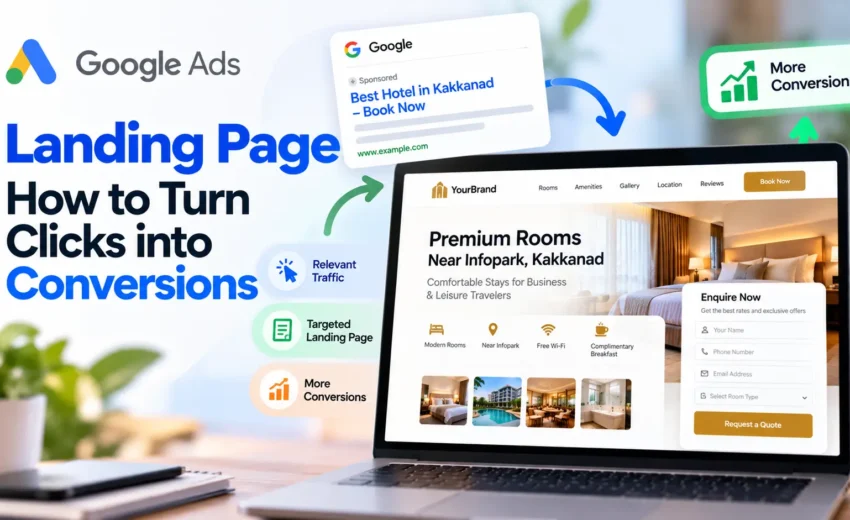
For example, imagine a hotel running a Google Ads campaign targeting the keyword “hotel near Infopark Kochi”.
Instead of directing visitors to the hotel’s homepage, the business can send them to a dedicated landing page that highlights:
- Room options and facilities.
- Distance from Infopark.
- Room photographs.
- Pricing or booking information.
- Customer reviews.
- A clear booking or enquiry button.
This gives visitors information directly related to what they searched for and makes it easier for them to take the next step.
Why Is a Landing Page Important for Google Ads?
Your advertisement creates the first impression, but the landing page helps visitors decide whether they want to continue.
A relevant and well-designed landing page can support better campaign performance in several ways.
1. Improves User Experience
Visitors expect to find information related to the advertisement they clicked. If the landing page provides exactly what they are looking for, they can understand the offer without unnecessary navigation.
2. Increases Conversion Opportunities
A dedicated landing page can remove distractions and focus attention on a specific action. Clear messaging, relevant information, and accessible enquiry options can encourage more visitors to convert.
3. Supports Google Ads Quality Score
Google considers landing page experience as one of the components of Quality Score, alongside expected click-through rate and ad relevance.
Landing page experience evaluates factors such as how relevant and useful your page is to people who click your advertisement.
A better landing page experience can contribute to stronger ad performance, although it does not guarantee a higher Quality Score or lower advertising costs.
4. Helps You Understand Campaign Performance
A dedicated landing page makes it easier to analyse visitor behaviour and conversion performance for a particular campaign.
You can track form submissions, phone calls, purchases, and other key actions to see whether your advertising investment is delivering meaningful results.
Landing Page vs Website Homepage: What's the Difference?
A homepage and a landing page serve different purposes. Both are important, but they are not always suitable for the same marketing objective.
Factor | Website Homepage | Google Ads Landing Page |
Main purpose | Introduce the overall business | Encourage a specific action |
Content | Covers multiple services or topics | Focuses on one offer or service |
Navigation | Usually includes full navigation | Often has simplified navigation |
Audience | General website visitors | Visitors from a specific campaign |
CTA | Multiple actions | One primary conversion goal |
For example, a digital marketing agency homepage may introduce SEO, Google Ads, Meta Ads, and content marketing services.
However, if the agency is advertising specifically for Google Ads management, a dedicated page explaining its Google Ads services, process, benefits, and enquiry options may be more relevant.
The right choice depends on the campaign objective and the user’s search intent.
8 Essential Elements of a High-Converting Google Ads Landing Page
Creating a landing page is not just about choosing an attractive design. Every section should help visitors understand the offer and decide what to do next.
Here are eight important elements to consider.
1. A Clear and Relevant Headline
Your headline should immediately explain what the page offers.
It should connect with the message in your Google Ads headline and the keyword or search intent behind the visitor’s query.
For example:
Google Ads Management Services for Business Growth
This headline tells visitors what the service is about without making them search through the entire page.
Avoid vague headlines that do not communicate a clear benefit.
2. Relevant and Helpful Content
The landing page should provide the information visitors need before making a decision.
Depending on the business, this may include:
- Service or product details.
- Key benefits and features.
- Pricing or package information, where appropriate.
- Delivery or service coverage.
- Answers to common questions.
Keep the content focused on the campaign. Avoid adding unrelated information that makes it harder for visitors to understand the offer.
3. A Strong Call to Action (CTA)
A Call to Action tells visitors what they should do next.
Examples include:
- Get a Free Consultation
- Request a Quote
- Book Your Appointment
- Enquire Now
- Buy Now
Your CTA should be visible, easy to understand, and connected to the campaign objective.
For lead generation, an enquiry form or consultation button may be suitable. For an online store, a purchase button may be more appropriate.
4. A Simple Enquiry Form
If your campaign focuses on lead generation, the form is one of the most important parts of your landing page.
Ask only for the information you genuinely need.
For example, a basic service enquiry form might include:
- Name
- Phone number
- Email address
- Service required
Too many fields can create unnecessary friction. Keep the form simple and explain what happens after submission.
Also, provide a clear confirmation message after a successful submission.
5. Trust Signals and Customer Reviews
Visitors may hesitate to share their contact details or make a purchase if they are unfamiliar with your business.
Trust signals can help address this concern.
Consider adding:
- Genuine customer testimonials.
- Verified reviews.
- Relevant certifications.
- Business contact details.
- Real project examples or case studies.
- Clear information about your company.
Use authentic information rather than exaggerated claims or fabricated reviews.
6. Mobile-Friendly Design
Many Google Ads visitors access landing pages through smartphones.
If your page is difficult to read or navigate on a mobile device, visitors may leave before taking action.
Check that:
- Text is readable without zooming.
- Buttons are easy to tap.
- Forms work properly on mobile.
- Images fit the screen.
- Important information is visible without excessive scrolling.
Always test your landing page on different screen sizes before launching your campaign.
7. Fast Page Loading Speed
A slow landing page can create a poor user experience and reduce the chances of visitors completing an action.
Improve loading performance by:
- Compressing images.
- Using modern image formats such as WebP.
- Reducing unnecessary plugins and scripts.
- Enabling browser caching.
- Choosing reliable website hosting.
- Avoiding excessive animations and heavy page elements.
Tools such as Google PageSpeed Insights can help identify performance issues and suggest improvements.
8. A Consistent Message Between Ad and Landing Page
One of the most important principles is message consistency.
If your advertisement promises a particular service, offer, or benefit, the landing page should clearly deliver on that promise.
For example, if your advertisement promotes affordable hotel rooms near Infopark, visitors should land on a page showing relevant room details, location information, and booking options.
Sending them to a general homepage without highlighting the advertised offer can create confusion.
How to Optimise Your Landing Page After Launch
A landing page should not be treated as a one-time design project. Its performance can be improved through continuous testing and analysis.
Here are some practical ways to optimise it:
- Test different headlines to identify which message connects better with your audience.
- Try different CTA wording and placements.
- Review form completion rates and remove unnecessary fields.
- Improve page loading speed and mobile usability.
- Analyse visitor behaviour to identify where users leave.
- Match landing page content more closely with your highest-value search terms.
- Review conversion data before making major design changes.
Make one meaningful change at a time where possible, and use sufficient data before deciding whether the change has improved performance.
Common Google Ads Landing Page Mistakes to Avoid
Even businesses with well-managed Google Ads campaigns can lose potential customers because of landing page issues.
Watch out for these common mistakes:
1. Sending all advertisements to the homepage: Different campaigns may target different services or audiences. A single homepage may not provide the most relevant experience for every visitor.
2. Unclear headlines: Visitors should understand the offer immediately. Avoid headlines that are too general or confusing.
3. Too many distractions: Excessive pop-ups, unrelated links, and unnecessary sections can take attention away from the main conversion goal.
4. Complicated forms: Asking for too much information can discourage potential customers from submitting an enquiry.
5. Poor mobile experience: A page that looks good on desktop may not work properly on mobile devices.
6. Missing conversion tracking: Without accurate tracking, it becomes difficult to understand whether your landing page is generating enquiries, purchases, or other valuable actions.
7. Misleading offers: The information on your landing page should match the advertisement. Do not promote offers or benefits that are unavailable when visitors arrive.
Final Thoughts
A successful Google Ads campaign isn’t just about getting visitors to click your ad. It is also about providing a relevant experience after they arrive on your website.
A well-optimised landing page connects the advertisement with the visitor’s expectations. Clear messaging, useful content, simple forms, mobile-friendly design, and accurate conversion tracking all contribute to a better experience.
If your Google Ads campaigns are generating clicks but not enough enquiries or sales, reviewing your landing page is a practical place to start.
At Mind Over Maze, we believe effective digital advertising combines the right targeting, relevant messaging, and a website experience designed to turn interest into meaningful business results.


October 26, 2026