Google Ads has changed a lot in recent years. The old way of managing campaigns—picking every keyword, bid, and audience setting yourself—is slowly fading. Now, AI-powered campaigns like Performance Max do most of the heavy lifting.
To make these automated campaigns work better, Google introduced something called Audience Signals.
But here’s the problem: most advertisers misunderstand what Audience Signals actually do. They treat them like traditional audience targeting, assuming they control exactly who sees their ads. That’s not how it works.
This guide will explain Audience Signals in plain terms—what they are, how they work, and how to use them without falling into common traps.
What Are Audience Signals?
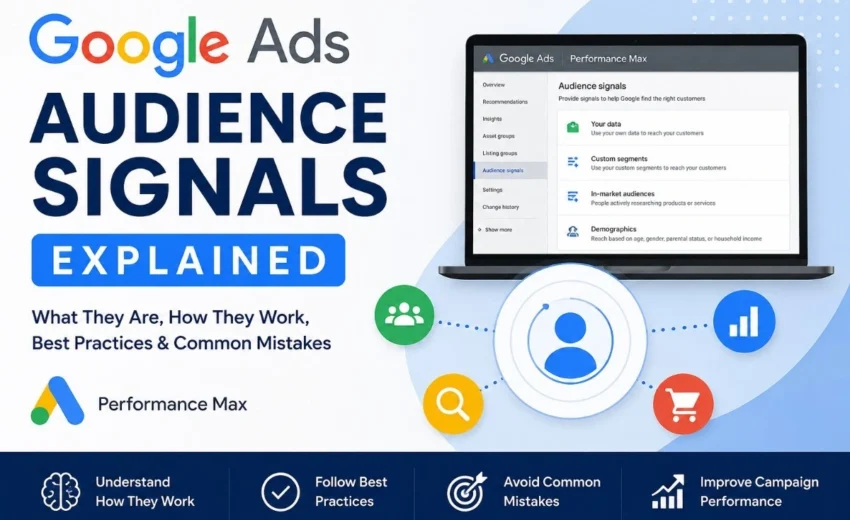
Audience Signals are a feature in Google Ads Performance Max that help Google’s AI understand who your ideal customers are.
Instead of telling Google exactly who to show your ads to, you give it information about your best customers. Think of it as giving someone directions to your house—you tell them the general area and landmarks, but they still need to figure out the exact route themselves.
The AI uses this information as a starting point. It analyzes behavior, interests, and conversion patterns to find people most likely to take action on your ads.
Here’s a simple way to remember it: Audience Signals are suggestions, not commands.
Why Google Created Audience Signals
Google didn’t create Audience Signals just to add another feature. There’s a real reason behind it.
As campaigns become more automated, Google’s AI needs context. Without Audience Signals, Google’s AI can still use other campaign inputs such as landing pages, creative assets, Search Themes, and conversion goals. However, Audience Signals provide additional context that may help the system identify relevant customers more quickly.
The AI still has plenty of information to work with. It analyzes your landing pages, ad creatives, business category, and historical account data. But Audience Signals give it a clearer picture of who you consider your ideal customer.
Here’s the key point—Google doesn’t stop there. As your campaign runs and collects conversion data, the AI continues learning. It may find new people who behave like your existing customers, even if they weren’t in your original signals.
This is why Audience Signals are flexible. They guide the AI without limiting it.
How Audience Signals Work in Practice
Let’s walk through the process step by step.
Step 1: Set Up Your Performance Max Campaign
Audience Signals live inside Performance Max campaigns. Specifically, you add them to something called an Asset Group.
An Asset Group is where you put your ad creatives—headlines, descriptions, images, videos, and calls to action. Each Asset Group can target a different product or customer type.
Step 2: Add Your Audience Signals
You can add different types of signals, including:
- Lists of previous customers (Customer Match)
- People who visited your website
- Custom audiences based on search behavior
- People actively shopping for products like yours
- Demographic details like age and location
The goal is to give Google a clear picture of who matters most to your business.
Step 3: The AI Starts Learning
Once your campaign goes live, Google’s AI examines your signals. It also looks at other important factors:
- Your conversion tracking data
- Your bidding strategy
- Your ad creatives and landing pages
- User behavior patterns
During this time, your campaign enters a learning phase. The AI is gathering data to figure out what works. Depending on your conversion volume and campaign activity, the learning phase may take several days or a few weeks. You should avoid making big changes during this time.
Step 4: The AI Expands Beyond Your Signals
As conversions come in, Google’s AI gets smarter. It starts finding people who look like your existing customers but weren’t in your original signals. If the AI predicts these new people are likely to convert, it will show them your ads.
This is the part that confuses people. Your ads may reach people outside your Audience Signals. That’s not a bug—it’s how the system is designed to work.
Types of Audience Signals You Can Use
Google offers several ways to build Audience Signals. You don’t need to use all of them, but knowing your options helps.
First-Party Data
This is your own customer data. It’s usually the most valuable type of signal because it comes from people who already know your business.
Examples include:
- Customer email lists (people who bought from you)
- Website visitors
- App users
- YouTube channel subscribers
The more specific your list, the better. For instance, a list of people who purchased in the last 90 days is more valuable than a list from two years ago.
Custom Segments
These let you build audiences based on specific interests, search terms, or websites.
For example, if you sell running shoes, you could create a Custom Segment for people who searched for “best running shoes for marathons” or visited competitor websites.
In-Market Audiences
These are people actively researching products or services right now. They’re close to making a purchase decision.
Examples include people shopping for cars, home loans, insurance, or travel packages.
Affinity Audiences
These are based on long-term interests and lifestyle. Unlike in-market audiences, these people aren’t necessarily ready to buy right now. They’re useful for building brand awareness.
Examples include travel enthusiasts, fitness lovers, or tech fans.
Detailed Demographics
You can provide basic information about your ideal customer, like age range, gender, or income level.
Life Events
Google can identify people going through major life changes—getting married, graduating, moving to a new home, or starting a business. These events often trigger new purchase decisions.
Audience Signals vs. Audience Targeting
This is where many advertisers get confused. These two things sound similar but are very different.
Audience Targeting is restrictive. When you use targeting, you’re saying: “Only show my ads to these specific people.” Your ads won’t reach anyone outside that group.
Audience Signals is suggestive. You’re saying: “These are the types of people I’m interested in, but feel free to explore beyond them if you find similar users.”
The difference is freedom. Targeting locks you in. Signals give the AI room to explore.
What Actually Drives Performance?
Some advertisers report minimal performance differences after changing Audience Signals, while others see improvements when using high-quality first-party data. Their impact depends on factors such as conversion tracking, campaign structure, and available data.
The things that consistently matter are:
- Conversion Tracking: This tells the AI what a successful conversion looks like. Without accurate tracking, the AI is flying blind.
- Smart Bidding: Your bid strategy determines how aggressively the AI competes for each user.
- Creative Quality: Your ads, images, and landing pages influence who clicks and converts.
In fact, Google’s AI may adjust its approach based on what the conversion data tells it. The algorithm follows the conversion data, not your suggestions.
This doesn’t mean Signals are useless. It means you should prioritize getting your conversion tracking right and creating strong ads. Signals are helpful, but they’re not the main event.
Best Practices for Using Audience Signals
If you want to use Audience Signals effectively, follow these guidelines.
Focus on Quality Over Quantity
Adding every available audience type is a mistake. It dilutes the signal quality. Instead, choose a few highly relevant signals.
A list of your top 1,000 customers is worth more than a dozen broad audience categories.
Prioritize First-Party Data
Your own customer data is usually the strongest signal. Upload email lists of your best customers, segment them by purchase value, and keep them updated.
Align Signals with Your Creatives
If you’re targeting honeymoon travelers, your ad headlines and images should reflect that. Misalignment confuses the AI and hurts performance.
Don’t Neglect Conversion Tracking
This cannot be overstated. Audience Signals tell the AI where to look. Conversion tracking tells it whether it was right. Both are needed, but tracking is the foundation.
Be Patient
Performance Max campaigns need time to learn. Depending on your conversion volume, the learning phase may take several days or a few weeks. Avoid making frequent changes during this time. Every edit can extend the learning process.
Monitor and Refine
After the learning phase, review your performance. If certain Asset Groups underperform, consider adjusting your signals or creative assets. But don’t make changes too often.
Common Mistakes to Avoid
Mistake 1: Treating Signals as Rules
This is the most common error. Assuming your Audience Signals restrict who sees your ads will lead to confusion and frustration. Remember: they’re suggestions, not commands.
Mistake 2: Adding Irrelevant Signals
Throwing in every audience type you can find doesn’t help. It confuses the AI and reduces signal quality.
Mistake 3: Ignoring Creative Quality
Even perfect signals won’t save bad ads. Invest time in strong headlines, images, and landing pages.
Mistake 4: Making Constant Changes
Performance Max needs time to learn. Frequent edits prevent the AI from optimizing. Give it space to work.
Mistake 5: Underestimating Conversion Tracking
Accurate conversion tracking is more important than Audience Signals. Without it, the AI has no feedback loop.
Realistic Expectations
What kind of results can you expect?
Results vary by industry, budget, and campaign setup. Some advertisers have reported improvements after refining their signals. Others see minimal difference. It depends on many factors.
The key takeaway is that Audience Signals are one piece of the puzzle. They help, but they work best when combined with strong conversion tracking, smart bidding, and quality creatives.
Final Thoughts
Audience Signals are a useful tool, but they’re often misunderstood. They’re not targeting rules. They’re guidance for Google’s AI.
The best approach is to use them thoughtfully. Focus on first-party data. Keep your signals relevant. Prioritize conversion tracking. And give your campaigns time to learn.
When used correctly, Audience Signals can help your Performance Max campaigns find the right customers faster. But they’re not magic. They work best as part of a complete strategy that includes strong creatives, accurate tracking, and smart bidding.
Understanding what Audience Signals actually do—and don’t do—is the first step to using them effectively. Now you have the information you need to get started.
Alfik P S
hi