
You have probably spent hours chasing backlinks and tweaking meta descriptions. But there is an SEO lever sitting right under your nose that you have full control over: internal links.
Unlike external backlinks, internal links do not require outreach, budgets, or waiting months for results. You can add, remove, or adjust them in minutes. And when done right, they help search engines understand your site better while keeping visitors engaged longer.
This guide walks you through the essentials—what works, what does not, and how to fix the gaps holding your site back.
What Internal Links Actually Do
An internal link is simply a hyperlink from one page on your domain to another. They appear everywhere:
- In the main navigation menu
- Within blog post content
- In footer sections
- On category or archive pages
- As breadcrumbs showing page hierarchy
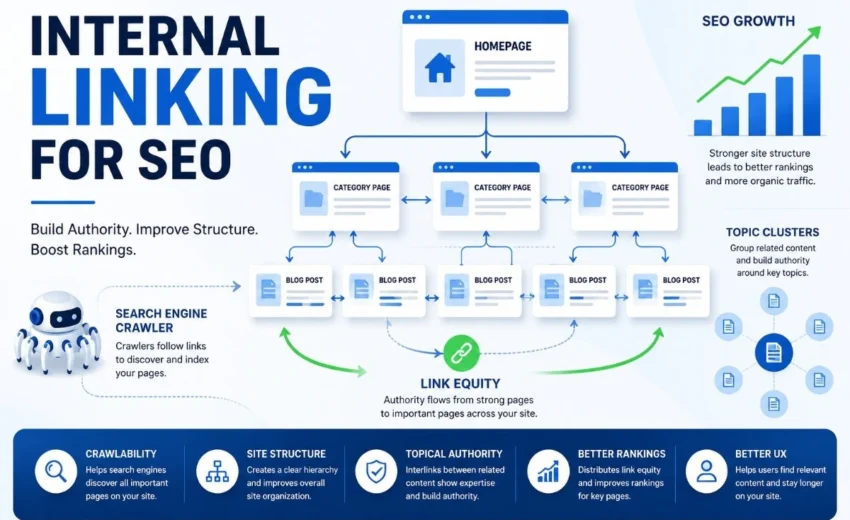
For visitors, these links make exploration easier. For search engines, they serve a bigger purpose. Crawlers follow internal links to discover new pages, understand relationships between topics, and decide which content deserves priority in indexing.
Why This Matters More Than You Think
Internal linking affects your site in two major ways.
For search engines:
- It helps crawlers find pages that would otherwise remain hidden.
- It shows which topics are connected, reinforcing your site’s overall theme.
- It distributes “link equity” (ranking strength) from strong pages to weaker ones.
For users:
- It reduces bounce rates by pointing readers to related, useful content.
- It builds trust when visitors can easily find deeper information on a subject.
- It improves the overall flow of your website, making it feel cohesive rather than scattered.
How Authority Moves Through Your Links
Not every page on your site carries the same weight. Some attract more backlinks or traffic, making them naturally “stronger.” When you link from a strong page to a newer or less visible page, you pass some of that strength along.
However, there is a catch. That strength gets divided among all the links on the page. If your strong page has dozens of random links, each one receives only a tiny fraction of the value. If it has only a few carefully chosen links, those destinations get a much more meaningful boost.
This is why quality beats quantity every time.
Building Subject Authority Through Connections
Search engines have become highly skilled at recognising expertise. They look at how thoroughly a site covers a topic. Internal links are a direct signal of that depth.
For example, if you publish guides on Google Search Console, keyword cannibalization, content refreshes, and internal linking—and connect them with relevant internal links—search engines gain a clearer understanding that your site has depth in SEO rather than a single isolated article. This also creates natural internal linking opportunities for your existing content.
This is often referred to as topical authority, and it can be just as valuable as individual page rankings.
Practical Best Practices to Follow
Applying these habits will turn your internal linking from random to strategic.
1. Write Anchor Text That Actually Helps
Anchor text is the clickable part of a link. Avoid vague phrases like:
- “Click here”
- “Read more”
- “This post”
Instead, use descriptive text that tells the reader what is coming:
- “A step-by-step guide to fixing duplicate content”
- “Common reasons pages lose rankings after updates”
This benefits both users and crawlers by providing clear context.
2. Link to Relevant Content Only
Before adding any internal link, ask yourself: Does this genuinely help the person reading right now? If the connection feels forced or off-topic, skip it. Relevance is non‑negotiable.
3. Do Not Forget About Deep Pages
Many site owners habitually link to their homepage or main category pages. That is fine, but the pages that need support most are often buried deeper in your site. Link directly to specific articles, product pages, or resources that might otherwise go unnoticed.
4. Revisit Older Content Regularly
Whenever you publish a fresh article, spend five minutes updating a few older posts with links to it. This revives older content and helps search engines index new material faster.
5. Limit Links per Page
There is no perfect number of internal links. The goal is to include enough links to help users discover relevant content without making the page feel cluttered. Too many links distract readers and dilute the value passed to each destination.
Common Mistakes That Quietly Hurt Performance
Even well‑intentioned sites make these errors. Recognizing them is half the battle.
Orphan pages
These are pages with zero internal links pointing to them. They exist on your site but remain invisible to crawlers and hard for users to stumble upon. Finding and fixing these is one of the fastest SEO wins available.Generic anchor text
Phrases like “learn more” or “this post” are wasted opportunities. They provide zero context and do nothing to reinforce what the linked page is about.Broken internal links
Dead links create dead ends for visitors and waste crawl budget. Run a simple check every few months to catch and fix them.Linking only to new content
It is tempting to always link to your newest article, but your best, most authoritative pages deserve the most links—regardless of their publish date.Adding too many links
Overlinking makes your content feel cluttered and confuses search engines, trying to identify the most important relationships.
A Straightforward Audit Process
You do not need expensive tools to start improving your internal linking. A simple crawl using a tool like Screaming Frog (free for up to 500 pages) can reveal a lot.
Here is a practical workflow:
- Identify orphan pages – Look for pages with zero internal links.
- Check your deepest pages – Ensure every important page is reachable within 3 to 4 clicks from the homepage.
- Review your anchor text – Look for overused or generic phrases and replace them with descriptive alternatives.
- Find broken links – Fix any 404 errors you discover.
- Map topic clusters – Group related content and make sure pages within the same group link to each other.
This audit does not need to be perfect. Even addressing a few of these points can move the needle.
Final Thoughts
Internal linking is not complicated, and it does not require a large budget. It simply requires a bit of intention.
When you link thoughtfully, you help search engines navigate your site, distribute authority to pages that need it, and make your content more useful for real people. These small, consistent actions compound over time into a site that feels organised, trustworthy, and easy to explore.
Start with one old article. Add two relevant links to newer content. Find one orphan page and connect it. That single effort is already more than most sites ever do. And over weeks and months, those small steps build into a genuine competitive advantage.
Alfik P S
hi