A website can have many pages that are live but are not properly connected to the rest of the website. These pages are known as orphan pages.
The problem is that a normal website crawl may not find every URL on a website. A page might still be indexed by Google, included in an XML sitemap, or receiving visitors, even though no other page on the website links to it.
This is why finding orphan pages is an important part of a technical SEO audit.
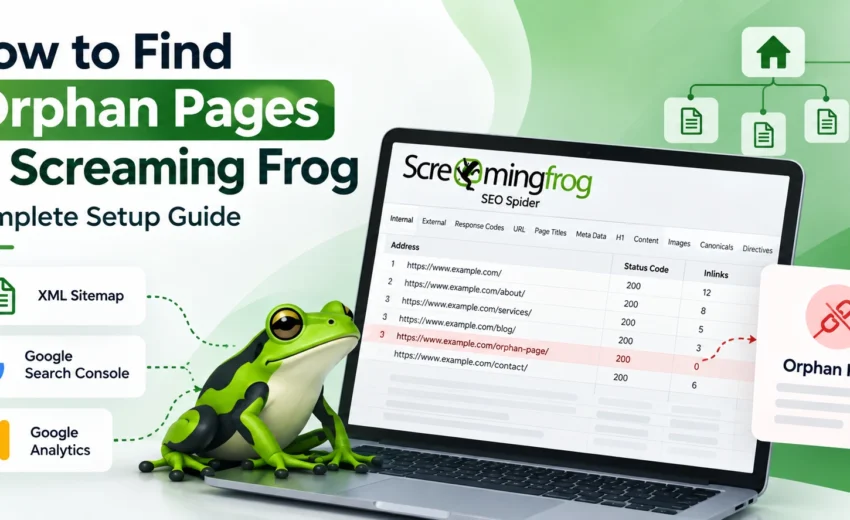
Screaming Frog SEO Spider can help you identify these pages by combining a normal website crawl with URL data from sources such as XML sitemaps, Google Search Console, and Google Analytics.
In this guide, we’ll look at how to find orphan pages using Screaming Frog and what you should do after finding them.
What Are Orphan Pages?
An orphan page is a URL that has no observed internal linking path from the starting point of a website crawl.
In simple terms, the page exists, but you cannot reach it by following internal links from the pages discovered during the crawl.
For example, a blog post may be live and receiving Google traffic, but if none of the other relevant pages on the website link to it, the page may be considered an orphan.
Orphan pages can happen for different reasons. A page may have been published without adding internal links, a website redesign may have removed links, or an old page may have become disconnected from the site’s structure.
It is also important to remember that not every orphan page is automatically a problem. Some pages may intentionally have limited internal links. The purpose of an audit is to find the pages that need attention.
Why Are Orphan Pages Important for SEO?
Internal links help users navigate a website and help search engines understand how different pages are related.
When an important page has no internal links pointing to it, it becomes disconnected from the website’s normal structure.
This can create several issues.
Users May Not Discover the Page
Visitors usually move through a website by following navigation menus and internal links. If an important page isn’t linked anywhere, users may have difficulty finding it.
Search Engines Get Fewer Internal Signals
Internal links provide context about the relationship between pages and help search engines understand a site’s structure.
An orphan page can still be discovered and indexed through other sources, but it doesn’t receive the same internal linking signals as a properly connected page.
Important Content Can Become Isolated
A useful blog post, service page, product page, or landing page can continue to exist without being connected to related content.
An orphan-page audit helps you find these disconnected pages and decide whether they should be better integrated into the website.
Why Use Screaming Frog?
Screaming Frog SEO Spider is a website crawler widely used for technical SEO.
It can crawl a website and collect information about URLs, internal links, status codes, page titles, canonicals, indexability, headings, structured data, and other SEO elements.
However, a normal crawl mainly discovers URLs by following links.
If a page isn’t linked from the pages Screaming Frog can reach, the crawler may not discover it through the normal crawl.
This is where additional URL sources become useful.
Screaming Frog can use information from:
- XML Sitemaps
- Google Search Console
- Google Analytics
By comparing these URLs with the URLs discovered through internal links, you can find pages that may be orphaned.
How to Find Orphan Pages Using Screaming Frog
Step 1: Crawl Your Website
Open Screaming Frog SEO Spider and enter your website URL.
Start a normal crawl and allow it to finish.
This gives you the first set of URLs that Screaming Frog can discover by following the website’s internal links.
You can also use this crawl to understand the website’s current structure, including internal links, status codes, indexability, canonicals, titles, headings, and crawl depth.
Step 2: Connect Your XML Sitemap
Next, use your website’s XML sitemap as an additional source of URLs.
An XML sitemap contains URLs that a website wants search engines to know about. However, being included in a sitemap does not guarantee that a page will be indexed.
For an orphan-page audit, the sitemap is useful because it may contain URLs that Screaming Frog cannot discover through internal links.
In Screaming Frog, configure the crawler to crawl your XML sitemap. Depending on your setup, the sitemap can be discovered through robots.txt or entered directly.
If your website uses WordPress with an SEO plugin such as Rank Math or Yoast SEO, the sitemap is often generated automatically.
Step 3: Connect Google Search Console
The next source is Google Search Console.
Search Console can provide information about URLs that have appeared in Google Search data.
Connect your Google Search Console account through Screaming Frog’s API Access settings.
Once connected, configure Screaming Frog to use URLs discovered through Search Console.
The exact interface may vary depending on your Screaming Frog version, so the option names may look slightly different.
Why Is Search Console Useful?
Suppose a page has received impressions in Google Search, but Screaming Frog couldn’t discover the page through the website’s internal links.
That difference is useful information.
It means the URL appears in Google’s search data but isn’t being discovered through the site’s normal internal linking structure.
The page should then be reviewed to understand why.
Step 4: Connect Google Analytics 4
You can also connect Google Analytics 4 to Screaming Frog.
GA4 can provide another source of URL information by showing pages that have received tracked visits during your selected date range.
This can help identify pages that users are visiting even though they aren’t connected through internal links.
When selecting a date range, use a period that provides enough data to understand the website’s traffic. A very short period may not give you a complete picture.
Keep in mind that Analytics data depends on your tracking setup. If tracking wasn’t working correctly on a page, the absence of Analytics data doesn’t necessarily mean the page has never received visitors.
Step 5: Allow Screaming Frog to Crawl New URLs
After connecting Google Search Console and Google Analytics, make sure Screaming Frog is configured to crawl newly discovered URLs from these sources.
This allows the crawler to investigate URLs that weren’t found during the normal internal crawl.
This step is important because simply connecting an account doesn’t mean every URL from that source will automatically become part of the crawl.
Step 6: Run the Crawl
Once your URL sources are configured, start the crawl.
Screaming Frog can now work with a broader set of URLs from:
Internal links + XML Sitemap + Google Search Console + Google Analytics
The purpose is to compare URLs discovered through your website’s internal structure with URLs found through these additional sources.
Step 7: Run Crawl Analysis
After the crawl is complete, run Crawl Analysis if required by your Screaming Frog setup.
This allows Screaming Frog to process the crawl data and populate the relevant filters and reports.
Once the analysis is complete, you can start reviewing potential orphan URLs.
Step 8: Review the Orphan URLs
Screaming Frog provides filters and reports that can help you identify URLs discovered through sources such as:
- Sitemaps
- Google Analytics
- Google Search Console
The important question isn’t simply:
“Is this an orphan page?”
Instead, ask:
“Why does this URL exist, and why isn’t it connected through the website’s internal links?”
That question helps you make a better SEO decision.
Step 9: Check the Page Before Making Changes
Finding an orphan URL doesn’t mean you should immediately add an internal link.
Review the page first.
Check its:
- HTTP status
- Indexability
- Canonical URL
- Search performance
- Website traffic
- Content quality
- Business value
You should also check whether another page already covers the same topic.
This helps you understand whether the page should be improved, connected, redirected, removed, or simply left as it is
What Should You Do With Orphan Pages?
The right action depends on the purpose and quality of the page.
Add Internal Links
If the page is useful and relevant, find suitable pages that can naturally link to it.
The link should provide value to users rather than being added simply to remove an orphan-page issue.
Update the Page
If the content is useful but outdated, update it before connecting it to other relevant pages.
Consolidate Similar Content
If another page covers almost the same topic, consider whether the content should be combined rather than maintaining two weak or overlapping pages.
Redirect the Page
If the page has been permanently replaced by another relevant URL, a 301 redirect may be appropriate.
However, an orphan page should not automatically be redirected just because it has no internal links.
Remove the Page
Some pages may no longer have any useful purpose. In those cases, removing the page may be the better option, depending on its status and history.
Leave It Alone
Some URLs are intentionally isolated or have a specific technical purpose. If there is a good reason for the page to remain as it is, no change may be necessary.
Common Mistakes When Finding Orphan Pages
Assuming Every Orphan Page Is Bad
An orphan page is not automatically an SEO error. Always review the page before deciding what to do.
Using Only the XML Sitemap
A sitemap is useful, but it is only one source of URL information. Combining it with Search Console and Analytics can provide a broader view.
Linking Every Orphan Page
Don’t add internal links just for the sake of removing orphan URLs. Internal links should be relevant and useful.
Redirecting Every Orphan Page
Being an orphan doesn’t mean that a page should be redirected. First understand its purpose, traffic, content, and value.
Ignoring Old or Unnecessary URLs
An orphan-page audit can also reveal old campaign pages, duplicate content, outdated articles, and other URLs that may need to be cleaned up.
Final Thoughts
Finding orphan pages is not about trying to connect every URL on a website.
The real goal is to identify important pages that have become disconnected from the website’s internal structure and understand whether that affects users, search engines, or the overall quality of the site.
Screaming Frog makes this process easier by combining a normal website crawl with additional URL sources such as XML Sitemaps, Google Search Console, and Google Analytics.
Once you find potential orphan pages, take time to review them before making changes.
Some pages may need better internal links. Others may need updating, consolidation, redirection, or removal. Some may not need any action at all.
A good orphan-page audit is ultimately about creating a website where important content is easy to discover, logically connected, and useful to both users and search engines.


October 2, 2026