Imagine publishing a high-quality blog post, service page, or landing page, only to realise that neither your visitors nor search engines can easily find it. The page exists, but it isn’t connected to the rest of your website.
This is known as an orphan page.
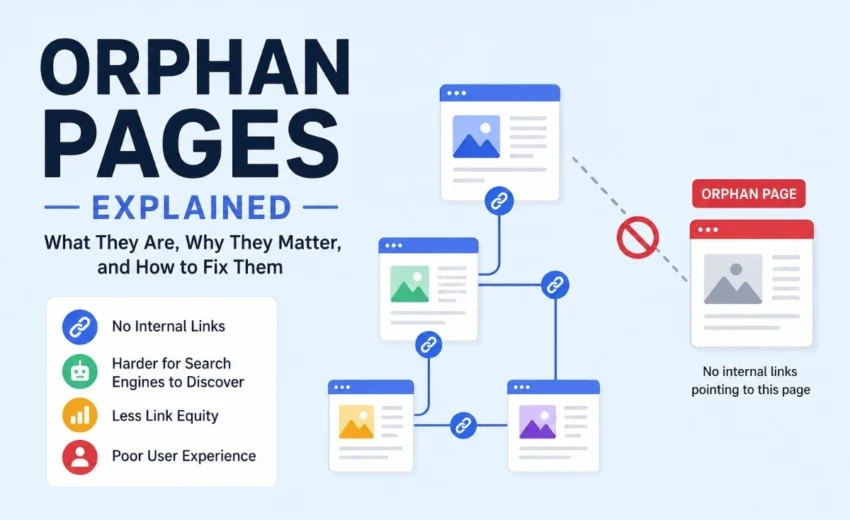
An orphan page is a webpage that has no active, crawlable incoming internal links from other pages on the same website. While search engines like Google and Bing may still discover these pages through an XML sitemap, external backlinks, or previous crawls, the lack of internal links makes them harder to crawl, understand, and rank.
Internal links help search engines understand your website’s structure, distribute link equity, and guide users to relevant content. When an important page becomes orphaned, it misses these benefits and may receive little organic traffic despite having valuable content.
In this guide, you’ll learn what orphan pages are, why they affect SEO, how they occur, how to identify them, and the best ways to fix them.
Key Takeaways
Orphan pages have no active, crawlable incoming internal links from other pages on your website.
They can reduce crawl efficiency and limit internal link equity.
Google may still discover them through XML sitemaps, backlinks, or previous crawls, but they often receive less visibility.
Website migrations, deleted navigation links, and poor content management are common causes.
Regular technical SEO audits help identify and fix orphan pages before they affect search performance.
What Are Orphan Pages?
An orphan page is a webpage that has no active, crawlable incoming internal links from other pages on the same website.
Think of your website as a road network. Every webpage is a destination, while internal links are the roads connecting those destinations. If one destination has no roads leading to it, visitors and search engines are far less likely to find it naturally.
For example, imagine you publish a blog post titled “SEO Checklist for Small Businesses.” You publish it successfully but forget to:
Link to it from related blog posts.
Add it to your blog category.
Include it in your resources page.
Feature it on your homepage.
The page exists and may even appear in your XML sitemap, but because nothing links to it internally, it becomes an orphan page.
Can Search Engines Find Orphan Pages?
Yes—but not always.
Google primarily discovers new content by following internal and external links. It can also find pages through XML sitemaps, Google Search Console’s URL Inspection tool (when you request recrawling), previous crawls, and other discovery signals.
However, internal links remain one of the strongest indicators of a page’s importance within your website. A page that’s well connected through relevant internal links is generally easier for search engines to crawl, understand, and revisit than one that exists in isolation.
Why Orphan Pages Matter for SEO
Not every orphan page is a problem. For example, private landing pages used for paid advertising, customer-only resources, or campaign pages may intentionally remain isolated.
However, important pages should always be connected to your website’s internal linking structure.
Reduced Crawlability
Search engines discover and revisit webpages by following links. When a page has no internal links, Googlebot has fewer opportunities to crawl it regularly.
On larger websites, this can reduce crawl efficiency and delay the discovery of new or updated content.
Lost Internal Link Equity
Internal links pass authority, often called link equity, between pages.
Without incoming internal links, orphan pages receive little or no authority from the rest of your website, making it more difficult for them to compete in search results.
Poor User Experience
Visitors rely on menus, category pages, breadcrumbs, and contextual links to navigate a website.
If an important page isn’t linked anywhere, users are unlikely to discover it naturally, even if the content provides useful information.
A strong internal linking strategy improves both usability and SEO.
What Causes Orphan Pages?
Most orphan pages are created accidentally during routine website maintenance.
Common causes include:
Website redesigns or migrations
Deleted navigation links
Poor internal linking
Forgotten landing pages
Expired marketing campaigns
Changes to URL structures
CMS publishing mistakes
Removing category or tag pages without updating internal links or redirects, which can disconnect existing pages from your site’s navigation
From experience, orphan pages often appear after website redesigns. During a migration, menus are updated, categories are reorganised, or old URLs are removed. If internal links aren’t reviewed afterward, valuable pages can easily become disconnected without anyone noticing.
How to Find Orphan Pages
Finding orphan pages requires comparing multiple sources of website data rather than relying on a standard crawl.
A simple audit workflow looks like this:
Crawl your website using Screaming Frog SEO Spider.
Export your XML sitemap.
Compare the crawl data with your sitemap and Google Search Console.
Identify URLs that exist but aren’t connected through internal links.
Decide whether to link, redirect, or remove each page.
Useful tools include:
Google Search Console
Compare indexed pages with your website’s internal linking structure. Pages appearing in Google’s index but missing from your internal linking structure may be orphaned.
XML Sitemap
Compare your XML sitemap against a website crawl. If URLs appear in the sitemap but aren’t discovered during the crawl, investigate whether they’re orphan pages.
Screaming Frog SEO Spider
Screaming Frog compares crawl data with XML sitemaps and analytics to identify pages that exist but aren’t connected through internal links.
Both tools help identify orphan pages while also highlighting related technical SEO issues such as broken internal links, redirect chains, and crawlability problems.
How to Fix Orphan Pages
The right solution depends on whether the page still provides value.
Add Internal Links to Valuable Pages
If the content is useful, reconnect it to your website by adding relevant internal links from:
Related blog posts
Category pages
Resource hubs
Pillar pages
Navigation menus (where appropriate)
Even a few contextual internal links can significantly improve discoverability.
Redirect Replaced Content
If an orphan page has been replaced by newer content, implement a 301 redirect to the most relevant page.
This preserves backlinks, consolidates ranking signals, and provides a better user experience.
Avoid redirecting every orphan page to the homepage. Only redirect when there’s a closely related replacement.
Remove Low-Value Pages
If the page no longer serves users, consider removing it and returning a 404 Not Found or 410 Gone status instead of leaving it orphaned.
Common Mistakes to Avoid
Avoid these common issues:
Publishing new content without adding internal links.
Forgetting to review internal links after a website migration.
Assuming an XML sitemap replaces internal linking.
Leaving outdated campaign pages live without reviewing their purpose.
Redirecting every orphan page to the homepage instead of a relevant replacement.
Best Practices
To prevent orphan pages from affecting your SEO:
Include every important page in your internal linking strategy.
Link new content from older, relevant articles.
Audit your website regularly using Google Search Console or SEO audit tools.
Keep your XML sitemap updated.
Review internal links after redesigns and migrations.
Redirect or remove outdated pages that no longer serve users.
A well-connected website is easier for both visitors and search engines to navigate.
Final Thoughts
Orphan pages are easy to overlook, but they can quietly reduce your website’s SEO performance by limiting crawlability, weakening internal link equity, and making valuable content difficult to discover.
Fortunately, they’re also one of the easiest technical SEO issues to fix. By maintaining a strong internal linking strategy, keeping your XML sitemap up to date, and auditing your website regularly using Google Search Console, Screaming Frog SEO Spider, Ahrefs, or Semrush, you can ensure your most important pages remain connected and accessible.
As your website grows, make orphan page audits part of your regular SEO maintenance. A well-organised website not only helps search engines understand your content but also creates a better experience for your visitors, improving both discoverability and long-term organic growth.






How to Find Orphan Pages in Screaming Frog: Complete Setup Guide - Mind Over Maze October 2, 2026
[…] A website can have many pages that are live but are not properly connected to the rest of the website. These pages are known as orphan pages. […]