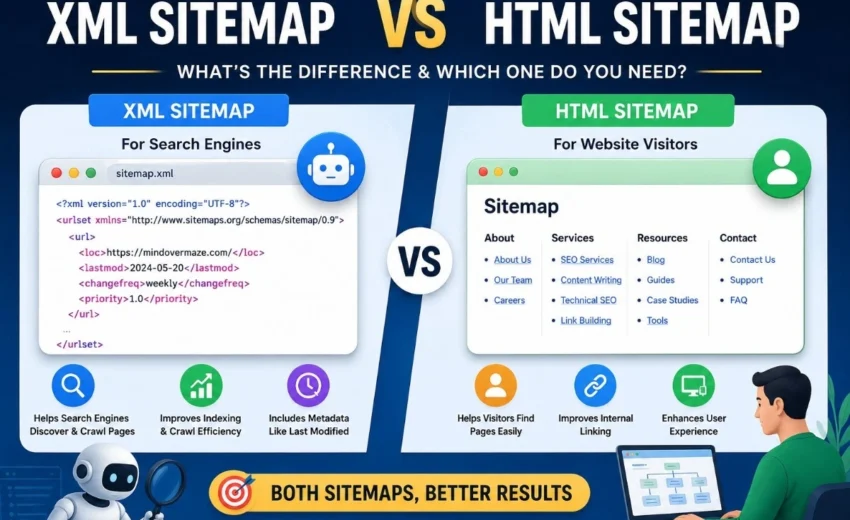
When website owners hear the word “sitemap,” they often assume there’s just one type. But there are actually two distinct kinds—XML sitemaps and HTML sitemaps—and they serve completely different purposes.
One helps search engines find your content. The other helps people navigate your website.
Understanding this difference matters because using the wrong type—or skipping them altogether—can affect how easily search engines discover your pages and how smoothly visitors explore your site.
In this guide, I’ll explain what each sitemap does, when you need them, and how to implement them correctly. No fluff, just practical information you can actually use.
What Exactly Is a Sitemap?
A sitemap is simply a structured list of pages on your website. Think of it like a table of contents for your site.
But here’s where it gets interesting: there are two formats, each designed for a different audience.
XML sitemaps are built for search engine bots.
HTML sitemaps are built for human visitors.
That’s the core distinction. Everything else flows from this fundamental difference.
XML Sitemaps: for
Search Engines
An XML sitemap is a file that lists all the important pages on your website in a format that search engines can easily read. It tells Google and Bing which pages exist and when they were last updated.
Think of it as handing a detailed map to a delivery driver so they know exactly where to go.
What Goes Into an XML Sitemap?
A typical XML sitemap includes:
The full URL of each page
The date it was last modified
(Optional) how often it changes
(Optional) its relative importance
A quick reality check: Google largely ignores the “how often it changes” and “importance” tags. Search engines treat these as suggestions at best. The only metadata that genuinely matters is the last modification date.
When Do You Need an XML Sitemap?
An XML sitemap becomes valuable in several situations:
Your site has over 100 pages. The more pages you have, the harder it is for search engines to discover everything naturally through internal links.
You publish new content frequently. News sites, blogs, and e-commerce stores benefit from telling search engines about fresh pages quickly.
Some pages lack internal links. If certain pages aren’t linked from anywhere else on your site, an XML sitemap ensures search engines still find them.
Your site structure is deep. Pages buried five or six clicks from the homepage might not get crawled regularly without a sitemap.
Critical Technical Limits
Google enforces two hard limits on XML sitemaps:
Maximum of 50,000 URLs per sitemap file
Maximum file size of 50 MB (uncompressed)
If your site exceeds either limit, you must split your sitemap into multiple files and use a sitemap index file to tie them together. This is a common mistake that can prevent search engines from reading your full sitemap.
For large sitemaps, you can also use gzip compression. Serving your sitemap as sitemap.xml.gz reduces file size and speeds up loading times.
How to Submit an XML Sitemap
Once you’ve created your XML sitemap, you need to tell search engines about it. Here’s how:
Submit through Google Search Console. This is the most direct method. Go to Index → Sitemaps, enter your sitemap URL, and click Submit.
Add it to your robots.txt file. Place this line anywhere in your robots.txt file:
text
Sitemap: https://yourdomain.com/sitemap.xml This helps search engines discover your sitemap even without Search Console submission.
Submit to Bing Webmaster Tools if you use it. This is optional but helpful for Bing coverage.
Common XML Sitemap Mistakes
Avoid these pitfalls:
Including noindex pages. Pages marked as “noindex” shouldn’t appear in your sitemap. This sends mixed signals to search engines.
Including redirect URLs. Only include the final canonical URL. Redirect chains waste crawl budget.
Forgetting to update. If you add new content, update your sitemap. Dynamic sitemaps (generated by SEO plugins) handle this automatically.
Exceeding size limits. Remember the 50,000 URL and 50 MB caps.
Not monitoring errors. Check your sitemap status in Google Search Console to catch and fix issues early.
XML Sitemap vs Robots.txt: What's the Difference?
This is a common point of confusion, so let’s clear it up.
An XML sitemap tells search engines which pages you want them to discover and potentially index. It’s an invitation to crawl specific URLs.
A robots.txt file tells search engines which parts of your website they may or may not crawl. It’s a set of instructions that can block access to certain directories or pages.
They work together but serve opposite purposes. Your robots.txt file might block search engines from crawling your admin area or staging site, while your XML sitemap actively encourages them to crawl your important content pages.
HTML Sitemaps: For People
An HTML sitemap is a regular webpage that lists your site’s pages in an organised, clickable format. It’s designed for visitors who want to browse your content by category or find something they missed in the main navigation.
Think of it as a store directory that shows customers where everything is located.
When Are HTML Sitemaps Useful?
HTML sitemaps make the most sense for:
Very large websites with thousands of pages where navigation menus can’t cover everything
E-commerce stores with hundreds of product categories
News and media sites with extensive archives
Documentation portals where users need to browse by topic
Sites with complex or unclear navigation that frustrate visitors
The Current Consensus on HTML Sitemaps
Here’s where opinions have shifted in recent years.
Most SEO professionals now agree that HTML sitemaps are largely unnecessary for the average website. If your site has clear navigation, a well-structured menu, and a logical footer, visitors can find what they need without a dedicated sitemap page.
That said, HTML sitemaps aren’t harmful. They can still provide value in specific situations:
They create additional internal links, which helps distribute link equity
They reduce crawl depth, making deep pages more accessible
They improve accessibility for users with screen readers
They give you control over anchor text for important pages
But for a typical blog or business site with a few hundred pages, an HTML sitemap simply isn’t essential. You’re better off investing that effort in improving your main navigation and internal linking structure.
XML Sitemap vs HTML Sitemap: Quick Comparison
Feature
XML Sitemap
HTML Sitemap
Primary Audience
Search engine crawlers
Human visitors
File Format
.xml (or .xml.gz)
.html or .htm
Visible to Users
No
Yes
Purpose
Page discovery & metadata
Navigation & site structure
Submitted to Search Consoles
Yes
No
Direct SEO Impact
Indirectly supports discovery and crawl efficiency
Improves internal linking
Update Frequency
Often dynamic
Usually static
Typical Location
/sitemap.xml
Footer link
Technical Limits
50,000 URLs / 50 MB max
No hard limits
Other Sitemap Types You Should Know About
Beyond standard XML and HTML sitemaps, there are a few specialised formats worth mentioning:
Image Sitemaps help Google discover images on your site for Google Image Search. You can include image metadata like title, caption, and location.
Video Sitemaps are useful for sites with video content. They allow you to include video metadata such as duration, title, description, and thumbnail URL.
News Sitemaps are required for Google News inclusion. They must include publication dates, article titles, and keywords following strict guidelines.
Sitemap Index Files are used when you have multiple sitemap files. They act as a master list that references all your individual sitemaps.
Most modern SEO plugins support these advanced sitemap types automatically, so you don’t need to create them manually.
Which One Does Your Website Need?
Here’s a straightforward way to decide:
Start with an XML sitemap. This is the baseline recommendation for almost every website. If you have more than 50 pages, you should have one. If you’re using WordPress, plugins like Rank Math, Yoast, or AIOSEO generate one automatically.
Consider an HTML sitemap only if: Your site has thousands of pages, your navigation genuinely confuses visitors, or you have specific accessibility requirements. For the vast majority of sites, it’s optional.
The current SEO consensus clearly favours XML sitemaps. They deliver indirect but measurable benefits for crawl efficiency and URL discovery. HTML sitemaps, while not harmful, rarely move the needle for most websites.
A Practical Example
Let’s say you publish a new article on your WordPress site using Rank Math. The plugin automatically updates your XML sitemap to include the new URL.
Once Google Search Console detects the updated sitemap, Googlebot can discover the new article more efficiently during future crawls. This means your fresh content has a better chance of being indexed sooner than if you relied solely on internal links.
This same principle applies whether you’re using Yoast, AIOSEO, or any other SEO plugin. The key is ensuring your sitemap stays dynamic and up to date.
How to Create an XML Sitemap
For WordPress Users
The easiest approach is using an SEO plugin. Rank Math, Yoast SEO, and AIOSEO all generate dynamic XML sitemaps automatically. They update whenever you publish, edit, or delete content. Your sitemap will typically be available at yourdomain.com/sitemap.xml.
For Other Platforms
Shopify generates sitemaps automatically at /sitemap.xml
Wix creates sitemaps by default
Webflow includes sitemap generation in project settings
Custom sites can use online generators or server-side scripts
Manual Creation
If you’re building sitemaps from scratch, follow the official sitemap protocol. Remember the 50,000 URL and 50 MB limits. For larger sites, create a sitemap index file that references multiple smaller sitemaps.
Final Thoughts
A well-maintained XML sitemap is one of the simplest yet most effective technical SEO improvements you can make. Combined with strong internal linking and quality content, it helps search engines discover and understand your website more efficiently.
HTML sitemaps, while not essential for most sites, can still provide value in specific scenarios. Rather than automatically implementing both, take a moment to evaluate whether an HTML sitemap genuinely serves your users.
For most websites, the answer is clear: prioritise your XML sitemap, keep it clean and up to date, and submit it properly to Google Search Console. That foundational practice alone will set you up for better search visibility and sustainable organic growth.
[…] with a complete list of URLs from a CMS export, XML sitemap, or site crawl. Layer in performance data: organic traffic, keyword rankings, backlinks, […]









Content Pruning: When Removing Pages Can Improve SEO September 2, 2026
[…] with a complete list of URLs from a CMS export, XML sitemap, or site crawl. Layer in performance data: organic traffic, keyword rankings, backlinks, […]