
If you run Google Ads, you already know that most people scroll past ads quickly. A short headline and a couple of lines of description often aren’t enough to grab attention or convince someone to click.
That’s why Google introduced Assets (formerly called Ad Extensions). They let you add useful extra information to your ads without making them messy.
This guide explains what Assets are, why they matter, and how to use them effectively. No unnecessary examples. Just clear, practical information.
What Are Google Ads Assets?
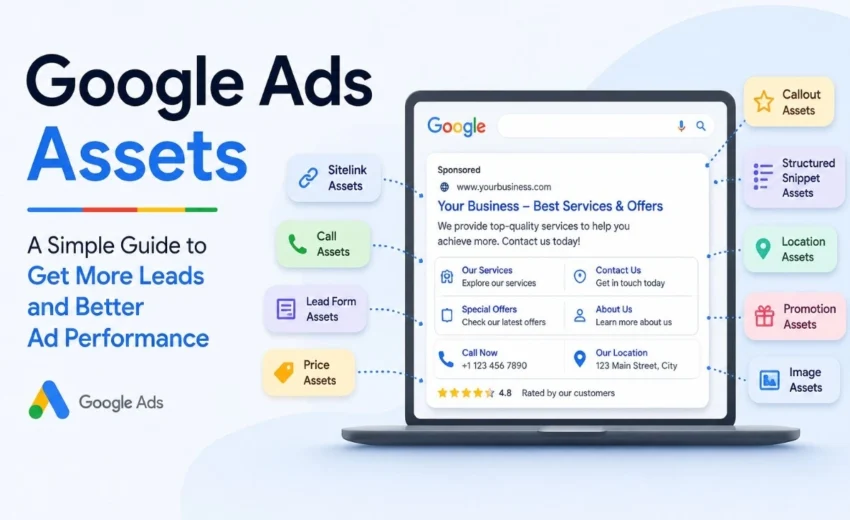
Assets are additional pieces of information you attach to your search ads. Instead of showing only a headline and description, your ad can also show things like:
- Extra links to specific pages on your site
- Your phone number
- Your business address
- A short list of your services
- A special offer or discount
These additions make your ad larger and more helpful. People can see more about your business before they ever visit your website.
Why Bother Using Assets?
Google Ads Assets can improve ad visibility and provide additional opportunities for engagement. According to Google’s own documentation, using assets helps advertisers deliver more relevant information to potential customers.
Here’s what Assets do for you:
- Your ad takes up more space on the search results page, which can increase visibility.
- More people may click because they see useful information right away.
- You can attract better leads since people already understand what you offer before clicking.
- Mobile users benefit significantly – features like a click‑to‑call button or a map are very convenient on phones.
Assets are essentially free space within your existing ad. Using them well costs nothing extra but can improve results.
The Main Types of Assets You Should Know
Google offers many Asset types, but you don’t need to use all of them. Focus on the ones that make sense for your business.
- Sitelink Assets – Add extra links below your main ad. Instead of sending everyone to your homepage, you can link directly to “Services,” “Contact Us,” or “Pricing.”
- Call Assets – Display a phone number inside your ad. On mobile phones, users can tap it to call immediately. Useful for businesses where customers prefer speaking to someone first.
- Location Assets – Show your business address and a small map. People can see your location and get directions without visiting your website.
- Callout Assets – Short text phrases that highlight benefits. Examples: “24/7 Support,” “Free Delivery,” or “Licensed Professionals.” These do not link anywhere – they simply inform.
- Structured Snippet Assets – Display a list of specific offerings under a heading. For instance, under “Services,” you could list “Home Cleaning, Office Cleaning, Carpet Cleaning.” This helps users understand your range quickly.
- Lead Form Assets – Allow users to fill out a short form (name, email, phone) directly within the ad. They never leave the search results page. This can increase lead volume by reducing friction.
- Image Assets – Add a small image to your search ad. This works well for products, locations, or before/after photos. Not every search ad shows images, but when they do, they attract attention.
- Price Assets – Show a few products or services with prices. Example: “Basic Cleaning –50,”“Deep Cleaning–50,”“Deep Cleaning-90.” This helps users decide before clicking, reducing unqualified clicks.
- Promotion Assets – Highlight a discount or special offer. Example: “20% off – Limited time.” Google may also display a special tag next to your ad.
Manual vs. Automatic Assets
You can add Assets yourself – these are called manual assets. You decide exactly what to show.
Google can also add assets automatically using data from your account and website. These are called automatic assets. Examples include dynamic sitelinks or seller ratings.
Most advertisers use both. Manual assets give you control. Automatic assets fill gaps where you might have missed opportunities.
How AI Is Changing Google Ads Assets
Google now uses artificial intelligence to generate and test assets automatically. In campaign types like Performance Max, Google can create headlines, descriptions, and even images based on your website and product feeds. These are called automatically created assets (ACAs). The system learns which combinations perform best and adjusts over time. Advertisers can review and approve these assets before they go live. This reduces manual work while still giving you oversight.
Simple Best Practices
You don’t need a long checklist. Follow these few guidelines.
Use multiple asset types.
Using several relevant assets generally gives Google more opportunities to display useful combinations. One asset is better than none, but two or three different types usually work better.
Keep everything up to date.
If your phone number changes or a promotion ends, update your Assets immediately. Outdated information frustrates users and wastes ad budget.
Match Assets to your goal.
If you want phone calls, use Call Assets. If you want online bookings, use Sitelinks to your booking page or a Lead Form Asset. Do not add random Assets without purpose.
Check what’s working.
In your Google Ads account, you can see which Assets get clicks and which do not. Pause underperforming ones. Test new versions. Regular optimization and monitoring can improve long‑term campaign performance.
Think about mobile users first.
Most searches happen on phones. Ensure your Assets work well on small screens. Call buttons, maps, and lead forms are especially useful on mobile.
What to Avoid
Some advertisers add Assets but hurt their own performance. Avoid these common mistakes.
- Using only one Asset type, you leave potential results untapped.
- Adding duplicate sitelinks – sending users to the same page twice is confusing and wasteful.
- Sending every click to your homepage – use sitelinks to direct users to the most relevant page.
- Ignoring your Assets for months – outdated promotions or wrong phone numbers will cost you.
- Forgetting that not all Assets show every time – Google decides which combination to display based on context. That is normal. Providing more high‑quality Assets simply gives Google better options.
Do Assets Help With Ranking?
Assets do not directly change your bid or Quality Score. However, they often improve click‑through rates because ads become more informative and noticeable. When more people click your ad compared to others, Google may interpret that as higher relevance. Over time, this can positively influence your ad rank and potentially lower your cost per click.
Assets alone will not guarantee top positioning. But ignoring them will likely put you behind competitors who use them effectively.
Final Thoughts
Google Ads Assets are no longer optional extras. They are a standard part of running effective campaigns. They provide more information to potential customers, increase ad visibility, and create additional paths for engagement.
You do not need to use every Asset type. Pick two or three that fit your business. Add them to your campaigns. Review performance after a few weeks. Remove what does not work. Add more of what does.
If you are already spending money on Google Ads, setting up Assets is one of the easiest ways to get better results without increasing your budget.
Alfik P S
hi