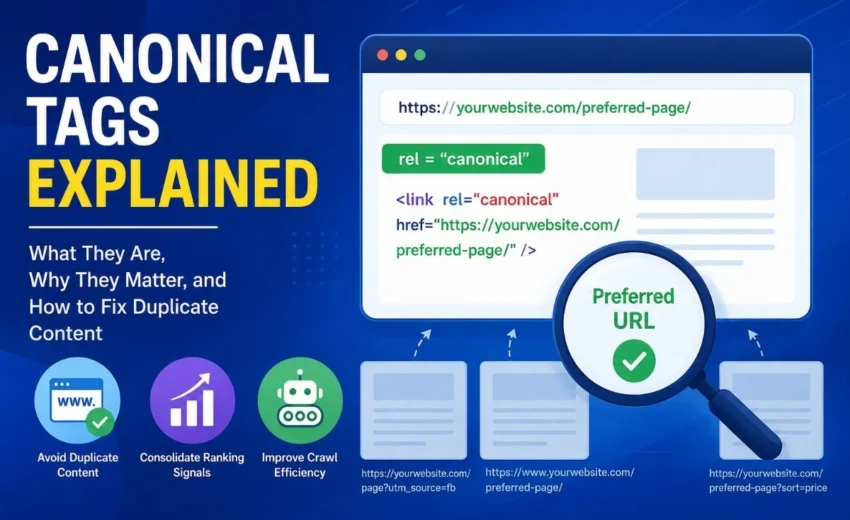
Have you ever noticed that the same webpage can be accessed through multiple URLs? For example:
https://example.com/product
https://example.com/product?utm_source=facebook
https://www.example.com/product
https://example.com/product?sort=price
Although these URLs may display the same content, search engines can treat them as separate pages. This can split ranking signals, dilute backlinks, and make it harder for Google to determine which version should appear in search results.
That’s where canonical tags come in.
A canonical tag tells search engines which URL is the preferred version of a page. When implemented correctly, it helps consolidate ranking signals, improves crawl efficiency, and reduces duplicate content issues without removing alternative URLs.
In this guide, you’ll learn what canonical tags are, why they matter, common mistakes to avoid, and the best practices for implementing them effectively.
What Is a Canonical Tag?
A canonical tag, also known as rel=”canonical”, is an HTML element placed inside the <head> section of a webpage.
This tag tells search engines that the specified URL is the preferred version of the page. If duplicate or similar versions exist, search engines can consolidate their ranking signals to the canonical URL instead of treating each version separately.
It’s important to understand that canonical tags are strong hints, not directives. Google usually follows them, but it may choose a different canonical URL if other signals—such as internal links, redirects, or XML sitemaps—suggest another version is more appropriate.
Why Duplicate Content Happens
Duplicate content is usually created unintentionally as websites grow. Some of the most common causes include:
URL parameters like ?utm_source=email or ?sort=price
HTTP and HTTPS versions of the same page
WWW and non-WWW versions of a website
Product filters and faceted navigation on e-commerce websites
Printer-friendly pages
Session IDs
Content syndication across multiple websites
For example:
https://example.com/shoes
https://example.com/shoes?color=black
https://example.com/shoes?utm_source=facebook
Although these pages may display the same products, search engines can see them as different URLs unless you specify the preferred version with a canonical tag.
Why Canonical Tags Matter for SEO
Canonical tags play an important role in technical SEO because they help search engines understand which version of a page should receive the SEO value.
Consolidate Ranking Signals
Backlinks, internal links, and other ranking signals can become split across duplicate URLs. Canonical tags help consolidate those signals into one preferred page.
Improve Crawl Efficiency
Search engines have a limited crawl budget. By identifying duplicate pages, canonical tags help crawlers focus on your most valuable content instead of spending time on unnecessary URL variations.
Reduce Duplicate Content Issues
Duplicate pages can confuse search engines about which URL should rank. Canonical tags provide a clear preference and help avoid this confusion.
Simplify Index Management
A consistent canonical strategy makes it easier for search engines to crawl, understand, and index your website correctly.
Canonical Tag vs 301 Redirect
Canonical tags and 301 redirects are often confused, but they solve different problems.
Canonical Tag
301 Redirect
Keeps multiple URLs accessible
Redirects users and search engines to a new URL
Suggests the preferred page
Permanently moves a page
Best for duplicate or similar content
Best for permanently moved or deleted pages
Use a canonical tag when multiple URLs need to remain accessible, such as filtered product pages or marketing URLs.
Use a 301 redirect when an old page has permanently moved and should no longer be visited.
Best Practices for Canonical Tags
To get the most value from canonical tags, follow these best practices:
Use absolute URLs instead of relative paths.
Add self-referencing canonical tags to all important indexable pages.
Point canonical tags only to pages that return a 200 OK status.
Include only canonical URLs in your XML sitemap.
Keep your internal links consistent with canonical URLs.
Use only one canonical tag per page.
Ensure canonical pages are not blocked by robots.txt or marked with noindex.
These practices provide consistent signals to search engines and reduce the chances of Google selecting a different canonical URL.
Common Canonical Tag Mistakes
Incorrect implementation can reduce the effectiveness of your SEO strategy.
Avoid these common mistakes:
Canonicalizing every page to the homepage.
Pointing canonical tags to 404 pages or redirected URLs.
Using multiple canonical tags on a single page.
Canonicalizing unique pages that should rank independently.
Including non-canonical URLs in your XML sitemap.
Blocking canonical pages using robots.txt or noindex directives.
After major website updates or migrations, it’s also a good idea to audit your canonical tags to ensure they still point to the correct URLs.
How to Check Canonical Tags
You can verify canonical tags using several SEO tools.
Google Search Console – Compare your declared canonical URL with Google’s selected canonical.
Ahrefs Site Audit and Semrush Site Audit – Identify canonical issues across your website.
Browser Source Code – Search for rel=”canonical” to confirm the preferred URL.
Regular audits help you identify issues before they affect crawling and indexing.
Frequently Asked Questions
Do canonical tags improve rankings?
Not directly. They help consolidate ranking signals and reduce duplicate content issues, which can support stronger overall SEO performance.
Does every page need a canonical tag?
Most indexable pages should have a self-referencing canonical tag to reinforce the preferred URL.
Can Google ignore canonical tags?
Yes. Canonical tags are strong hints, not commands. Google may choose another canonical page if other signals conflict with your preferred URL.
Are canonical tags important for small websites?
Yes. Even small websites can generate duplicate URLs through tracking parameters, HTTP/HTTPS versions, or inconsistent internal linking.
Final Thoughts
Canonical tags are one of the simplest yet most valuable elements of technical SEO. They help search engines identify the preferred version of a page, consolidate ranking signals, and improve crawl efficiency without removing duplicate URLs from your website.
For the best results, use self-referencing canonical tags, keep your XML sitemap and internal links consistent, and review your implementation regularly using tools like Google Search Console or Screaming Frog. Combined with a well-configured robots.txt file, a clean XML sitemap, and strong internal linking, canonical tags create a solid foundation for better indexing, improved search visibility, and sustainable organic growth.