Artificial intelligence has become a working part of most marketing teams’ daily routine — drafting content, organizing data, summarizing reports, and speeding up repetitive tasks. Among Google’s AI tools, Gemini is the one most marketers will run into first, because it’s built directly into the apps they already use: Docs, Sheets, Slides, Gmail, and Google Ads.
Gemini is a multimodal assistant — it can work with text, images, spreadsheets, and documents, not just generate written responses. This guide covers what it actually does for marketing work today, how the plans and naming have changed, and where the output still needs a human check before anything goes live.
Who Gemini Is Useful For
Most marketing roles can get some use out of it:
- SEO specialists
- Content marketers
- PPC managers
- Social media managers
- Email marketing specialists
- Marketing agencies and freelancers
- In-house teams and startup founders
The common thread is repetitive writing, research, and reporting work — the tasks that eat time without requiring much strategic judgment.
What Google Gemini Actually Is
Gemini is Google’s generative AI model family, available through a few different surfaces:
- The Gemini app (web and mobile) — free, with paid tiers layered on top
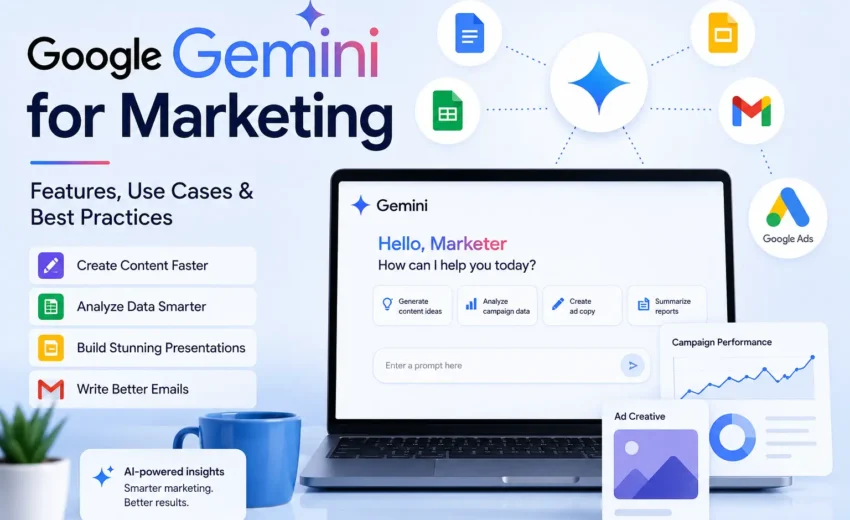
- Google Workspace — Gemini built into Docs, Sheets, Slides, Gmail, Drive, and Meet
- Google Ads — Gemini built into campaign creation, asset generation, and reporting
- Gemini API / Vertex AI — for developers building custom tools on top of the models
On subscriptions: Google retired the “Gemini Advanced” name in 2025. The current consumer tiers are Free, Google AI Plus, Google AI Pro, and Google AI Ultra, each unlocking more usage, longer context, and access to newer models. Pricing and feature allocation across these tiers change often enough that it’s worth checking Google’s current plan page rather than treating any number as fixed — this has moved more than once in the past year alone.
Google positions Gemini as a productivity layer, not a replacement for a marketer’s judgment. That distinction matters more here than in most software categories, because the main risk with AI-assisted marketing content isn’t that it fails to produce something — it’s that it produces something plausible-sounding and wrong.
Gemini Inside Google Workspace
Google Docs
Useful for generating a first-pass structure rather than a first-pass final draft:
- Blog outlines and structured drafts
- Rewrites of existing articles for clarity or tone
- Summaries of long documents into shorter briefs
The higher-value use is asking for an outline against a specific brief — audience, word count, required subtopics — and then writing the actual draft yourself using that scaffold, rather than asking for finished copy.
Gmail
Drafting and tone-adjusting for:
- Promotional and launch emails
- Follow-ups and internal notes
- Newsletters and event invites
Tone-shifting the same draft (formal vs. conversational) is one of the more genuinely time-saving uses here, provided the final version still gets a human read before sending.
Google Sheets
Helpful for the structural, non-creative side of campaign work:
- Campaign calendars and editorial plans
- Budget tables
- Keyword lists
- Performance summaries pulled from exported data
Google Slides
Can generate slide outlines and draft narratives for campaign reports or strategy decks, and can produce supporting visuals from text prompts. Image-generation access and limits vary by plan tier and have changed repeatedly, so confirm what’s actually included before promising a client a specific capability.
Drive and Meet
Gemini can summarize documents already stored in Drive and turn meeting notes into a shorter list of action items — useful for cutting down review time on long internal docs, less useful as a substitute for reading the source material on anything that matters.
SEO and Content Marketing
The main value here is speed on the repetitive parts of content production:
- Topic and headline brainstorming
- Content brief and outline generation
- FAQ and meta description drafts
- Repurposing one piece of content into multiple formats (LinkedIn post, email blurb, video script)
Specificity in the prompt is what separates a usable output from a generic one. “Write a blog about SEO” produces something you’ll rewrite entirely. A brief that specifies audience, word count, required subheadings, and examples produces something closer to a real starting draft — still requiring a fact-check and an edit pass, but a meaningfully shorter one.
Gemini in Google Ads
This is the part of the workflow that has changed the most. Gemini is no longer a separate assistant you draft ad copy in and then paste into Google Ads — it’s built directly into the platform:
- Performance Max campaigns use Gemini to generate and test creative asset combinations directly inside the campaign
- Asset Studio generates image, video, and text assets from natural-language prompts and brand guidelines, without leaving Google Ads
- Responsive Search Ad testing uses Gemini to generate and rotate headline/description combinations automatically
- A conversational reporting layer (branded as Ask Advisor) can summarize account performance and answer questions about a campaign in plain language, pulling from Ads, Analytics, and Merchant Center data
For an agency or freelancer, the practical shift is less about writing ad copy from scratch in a chat window and more about reviewing, constraining, and approving what the platform generates natively — brand guidelines, negative keywords, and campaign goals now do more of the steering work than manual prompt-writing does.
Social Media Marketing
Adapting one piece of content across platforms is a reasonable use case:
- A launch announcement reworked as a LinkedIn update, a short Instagram caption, a conversational Facebook post, and a concise X post
The value is consistency of message across formats, not originality — voice and platform-specific nuance still need a human pass, particularly for hashtag and caption conventions that shift often.
Email Marketing
Drafting and tone variation across:
- Welcome sequences
- Promotional and launch emails
- Subject line variations
As with Docs and Gmail, the tone-shifting is the more reliable use case; anything involving specific offers, dates, or claims needs a fact-check against the source material before it goes out.
Research and Reporting
Gemini can help organize and summarize exported campaign data — turning a raw GA4 export or an Ads report into a first-pass summary of trends and possible next steps. Treat this as a starting point for analysis, not the analysis itself — the summary should be checked against the underlying numbers before it’s used to justify a strategic decision or shown to a client.
Best Practices
- Write prompts that specify audience, objective, and tone rather than a generic instruction
- Treat every output as a first draft, not a finished asset
- Fact-check any statistic, claim, or platform capability before publishing — capabilities and plan names in this space change often enough that last month’s accurate statement can be wrong today
- Edit for brand voice; AI output tends toward a generic register by default
- Keep confidential client or business data out of prompts unless it’s covered by an internal AI-use policy
Frequently Asked Questions
Is Google Gemini free for marketers? There’s a free tier with basic chat, search integration, and limited image generation. Paid tiers (Google AI Plus, Google AI Pro, Google AI Ultra) add longer context, higher usage limits, and access to more capable models — check Google’s current plan page for exact limits, since these have changed more than once in the past year.
What happened to Gemini Advanced? Google retired the “Gemini Advanced” name in 2025 and folded it into the Google AI Pro and Google AI Ultra subscription tiers. Older articles and comparison tables may still reference the old name.
Does Gemini work inside Google Ads? Yes — it’s built directly into the platform through Performance Max asset generation, Asset Studio, and a conversational reporting layer, rather than functioning as a separate tool you draft copy in and paste over.
Should AI-generated marketing content be published as-is? No. Google’s own guidance and standard editorial practice both treat AI output as a draft that needs a fact-check and a human edit pass before publication, particularly for statistics, claims, and anything time-sensitive.
Final Thoughts
Google Gemini has become an important productivity tool for modern marketers by integrating AI into the applications they already use every day. Whether you’re writing blog posts, planning Google Ads campaigns, organizing spreadsheets, drafting emails, or preparing presentations, Gemini can help reduce repetitive work and accelerate content creation.
However, the real value of Gemini lies in how marketers use it. It works best as an intelligent assistant that supports research, organization, and content development—not as a replacement for expertise, creativity, or strategic thinking.
As AI continues to evolve, marketers who combine Google Gemini with strong marketing fundamentals, careful fact-checking, and a clear understanding of their audience will be better positioned to build effective campaigns, improve productivity, and deliver meaningful business results.
Alfik P S
hi