Running Google Ads is not just about choosing the right keywords and creating attractive ads. You also need to reach people in the locations where your business can serve them. If your ads target the wrong areas, you may spend money on clicks that are unlikely to generate useful enquiries or sales.
Google Ads location targeting helps businesses choose the geographic areas they want to reach. With the right settings, you can focus your advertising on relevant markets and make better decisions about your campaign budget.
In this guide, you’ll learn how location targeting works, how to set it up, and how to improve your campaign performance.
What Is Location Targeting in Google Ads?
Location targeting is a Google Ads feature that allows you to show ads to people associated with selected geographic areas.
You can choose countries, states, cities, or supported areas around a specific location, depending on your campaign type and the available targeting options.
The main purpose is to make your advertising more relevant to the people you want to reach. A business that serves customers in a particular city may not need to advertise across an entire country.
However, location targeting is not always an exact boundary. Google uses different signals to estimate a user’s location and geographic interests, so the results may not perfectly match the areas you select.
Why Is Location Targeting Important?
Choosing the right locations helps you focus your advertising budget on relevant audiences.
Reach the Right Audience
Your ads are more useful when they reach people who can actually purchase your products or use your services. Location targeting helps you focus on the markets that matter to your business.
Reduce Irrelevant Spending
If your business operates only in selected areas, advertising too broadly may generate clicks from people you cannot serve. Choosing suitable locations can help reduce this risk.
Improve Campaign Performance
When you understand which locations generate meaningful enquiries and sales, you can make better decisions about where to focus your advertising efforts.
Create More Relevant Ads
Location targeting also helps you align your advertising message with the needs of a particular market. Your ad and landing page can clearly communicate where your services are available.
Types of Location Targeting in Google Ads
Google Ads offers different geographic targeting options depending on your campaign and the locations available.
1. Country Targeting
Country targeting is useful when your business serves customers across an entire country. It can suit online stores, national service providers, and businesses with a broad customer base.
Before selecting a country, make sure your business can serve customers in the areas you intend to target.
2. State or Region Targeting
If your business operates in specific states or regions, you can select those areas instead of targeting an entire country.
This approach helps you focus your campaign on a more relevant market without restricting it to individual cities.
3. City Targeting
City targeting is useful when your customers are concentrated in particular cities. It allows you to focus your budget on areas where your products or services are available.
4. Radius Targeting
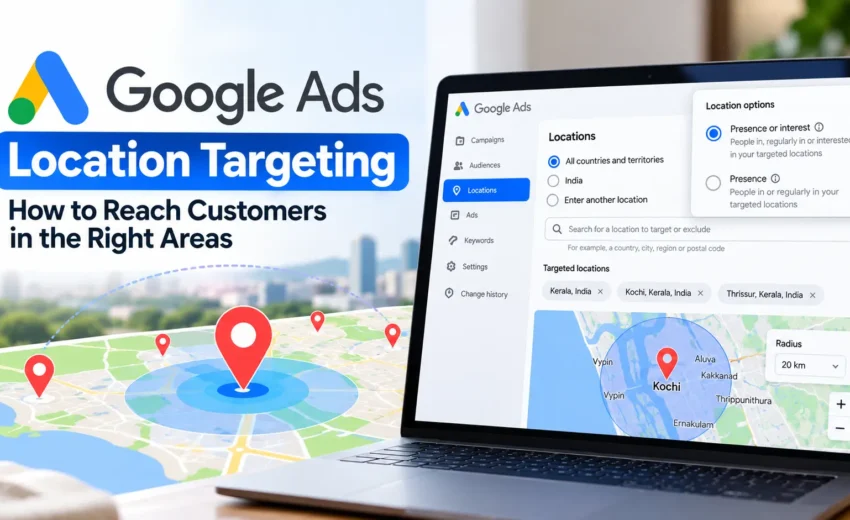
Radius targeting allows you to target an area around a selected point, such as your business location.
It can be useful for businesses that depend on nearby customers or operate within a defined service area. The appropriate radius depends on your business, customer travel patterns, and the areas you can serve.
Remember that radius targeting is based on Google’s location signals and does not guarantee an exact geographic boundary.
How to Set Up Location Targeting in Google Ads
Follow these steps to configure location targeting for your campaign.
Step 1: Open Your Campaign
Sign in to your Google Ads account and select the campaign you want to update.
Step 2: Open Location Settings
Navigate to the campaign’s location settings. The exact menu may vary depending on your campaign type and the current Google Ads interface.
Step 3: Select Your Target Locations
Search for the countries, states, cities, or other supported areas relevant to your business.
Choose locations based on where you can realistically provide your products or services.
Step 4: Review Advanced Location Options
Google Ads provides options that influence how people are matched to your selected locations.
- Presence or interest: Can reach people who are likely to be in or regularly in your targeted areas, as well as people who have shown interest in those areas.
- Presence: Focuses on people who are likely to be physically located in or regularly located in your targeted areas.
The default option for many campaign types is Presence or interest. The available options depend on the campaign type.
Choose the setting that matches your business requirements. If your service is limited to customers physically located in a particular area, Presence may be more suitable. If you want to reach people researching a destination from elsewhere, Presence or interest may be worth considering where available.
Step 5: Review Location Exclusions
If your business cannot serve certain areas, consider excluding those locations where appropriate.
For example, a business that provides services only in selected regions may want to exclude areas outside its service coverage.
Keep in mind that location exclusions do not always prevent every person associated with an excluded area from seeing an ad. Review your targeting settings carefully.
Step 6: Save and Monitor Your Campaign
After saving your settings, monitor the campaign’s performance.
Review clicks, conversions, cost per conversion, and lead quality to understand whether your selected locations are helping you reach the right audience.
How to Choose the Right Location Settings
The best location settings depend on how your business operates and where your customers are.
For a local business, targeting its actual service area may be a sensible starting point. For a business serving customers across a state or country, broader geographic targeting may be more appropriate.
Businesses that want to attract people planning to visit a destination may need a different approach from businesses that can serve only customers who are physically present in a particular area.
Before making a decision, consider three questions:
- Where can my business provide its products or services?
- Do I want to reach people physically in these areas or people interested in them?
- How will I measure whether the selected locations are generating valuable customers?
Answering these questions helps you choose settings based on business needs rather than simply trying to reach a larger audience.
How to Check Location Targeting Performance
Selecting locations is only the beginning. You should also review the results to understand whether your targeting is working as expected.
Review Geographic Performance
Use the geographic reporting options available in Google Ads to understand how your campaign performs across different areas.
Where available, distinguish between the locations you target and the geographic locations associated with users who interacted with your ads. These reports can provide different insights.
Compare Conversions and Costs
Look beyond impressions and clicks. Review conversions, cost per conversion, and lead quality to understand which locations contribute to your business goals.
A location that generates fewer clicks may still be valuable if it brings in more qualified customers.
Investigate Unexpected Traffic
If your campaign receives clicks associated with unexpected locations, review your advanced location options, geographic reports, and search terms.
Do not immediately assume that the settings are incorrect. Google estimates geographic relevance using multiple signals, and reported locations may not always reflect a user’s exact physical location.
Make Changes Based on Data
If a location consistently produces irrelevant enquiries or poor results, investigate the reason before changing your targeting.
You may need to adjust location settings, improve your ad messaging, or review the landing page. Excluding a location should be based on your business requirements and campaign evidence.
Common Location Targeting Mistakes to Avoid
Targeting too broadly: Choosing areas your business cannot serve may lead to irrelevant clicks and enquiries.
Using a radius that is too small: Very narrow targeting can limit your reach and reduce the number of potential customers.
Ignoring advanced location options: Your ads may reach people interested in a location even if they are not physically there, depending on your settings and campaign type.
Excluding locations too quickly: A small number of conversions does not automatically mean a location is unprofitable. Consider lead quality, conversion volume, and the time period being measured.
Focusing only on clicks: Clicks show that people interacted with your ads, but they do not necessarily indicate business success.
Ignoring conversion tracking: Without reliable tracking, it is difficult to understand which locations generate enquiries, sales, or other valuable actions.
Final Thoughts
Google Ads location targeting helps businesses focus their advertising on geographic areas that are relevant to their customers and services. However, choosing the right locations is only one part of a successful campaign.
You also need to understand the available location options, exclude unsuitable areas when necessary, and review campaign performance regularly.
Start by selecting the areas your business can serve, choose settings that match your audience, and measure results using meaningful business outcomes. With careful monitoring and data-based decisions, you can make your Google Ads campaigns more relevant and use your advertising budget more effectively.

Alfik P S
hi

October 15, 2026