Creating blog posts around different keywords is not always enough to build a strong SEO strategy. If your website covers many topics without a clear structure, visitors may struggle to find related information, and important pages may remain disconnected.
This is where topic clusters for SEO become useful.
Topic clusters help you organize your website content around a central subject and connect related articles through internal links. Instead of publishing isolated blog posts, you build a structured collection of content that helps users explore a topic in more depth.
In this guide, you’ll learn what topic clusters are, why they matter, and how to build them for your business website.
What Are Topic Clusters in SEO?
A topic cluster is a group of related website pages organized around one main subject.
It usually contains three important elements:
- Pillar page: The main page that covers a broad topic.
- Cluster content: Supporting articles that explain specific aspects of the main topic.
- Internal links: Links connecting the pillar page and relevant supporting articles.
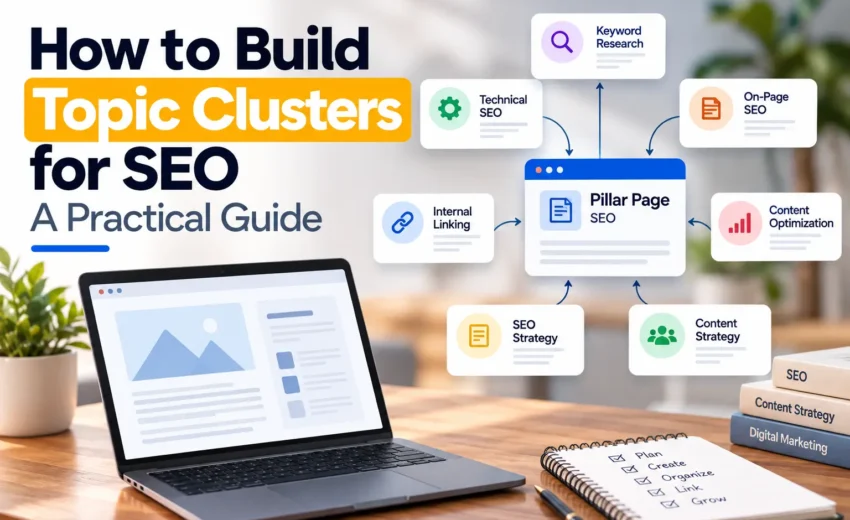
For example, a website covering digital marketing might have a main page about SEO. Supporting articles could cover keyword research, technical SEO, internal linking, and content optimization.
Each supporting article explores a specific subject, while internal links help users move between related pages.
The goal is to create a clear content structure rather than a collection of unrelated articles.
Why Are Topic Clusters Important for SEO?
Topic clusters can help improve how your website organizes and presents information. Their value comes from creating useful content and connecting related pages logically.
1. They Help Organize Website Content
When related articles are grouped around a central topic, your website becomes easier to navigate.
Visitors can move from a general guide to more detailed articles without having to search for every topic separately.
2. They Support Internal Linking
Internal links help users and search engines discover related pages on your website.
A well-planned topic cluster creates natural opportunities to connect supporting articles with the main page and with other relevant resources.
3. They Help You Cover a Topic More Completely
A single article may not answer every question a reader has about a broad subject.
Supporting articles allow you to explore individual questions in greater detail while keeping the overall content connected.
4. They Support Your SEO Strategy
A clear content structure can help search engines understand the relationships between your pages.
However, creating topic clusters does not automatically improve rankings. Each page still needs to provide useful information, satisfy search intent, and offer value to the reader.
Topic Clusters vs. Keyword Clusters
Topic clusters and keyword clusters are related, but they serve different purposes.
Topic clusters organize website pages around a broader subject. They focus on how different pieces of content relate to each other.
Keyword clusters group related search terms based on their meaning and search intent. They help you determine which keywords can be targeted by the same page and which may need separate content.
For example, several similar search terms might belong on one page if they represent the same search intent. Different questions within the broader subject could require separate supporting articles.
You can use keyword clustering during research and topic clustering when planning your website structure.
How to Build Topic Clusters for SEO
Building a topic cluster requires planning. The following steps will help you create a structure that supports your website goals.
Step 1: Choose a Main Topic
Start by identifying a subject that is closely connected to your business, products, or services.
Your main topic should be broad enough to support several useful articles but specific enough to remain relevant to your audience.
For example, a digital marketing website could choose SEO as a main topic.
Before selecting it, consider whether your audience searches for information about the subject and whether covering it supports your business goals.
Avoid choosing topics simply because they have high search volume. Relevance matters just as much.
Step 2: Research Supporting Topics
Once you have selected your main topic, identify the questions and related subjects your audience wants to understand.
You can use Google Search, Google Search Console, Google Keyword Planner, and SEMrush to discover relevant search terms and content opportunities.
Look for different aspects of the main topic, including:
- Beginner questions
- Practical how-to guides
- Common problems
- Technical explanations
- Comparisons
- Optimization techniques
The purpose is to identify useful supporting content, not to create an article for every keyword variation.
Review the search intent behind each topic before deciding whether it deserves a separate page.
Step 3: Create a Pillar Page
A pillar page provides a broad overview of the main subject and directs readers to more detailed resources.
It should introduce the important aspects of the topic without attempting to explain every detail in depth.
For example, an SEO pillar page could introduce keyword research, technical SEO, on-page optimization, and internal linking. Each section could link to a dedicated article that explains the subject further.
The pillar page should be useful on its own, even if the reader does not visit the supporting articles.
Step 4: Create Supporting Articles
Supporting articles should explore specific questions or subtopics in more detail.
Each article needs a clear purpose and should address a distinct user need.
Before creating a new page, check your existing content. You may already have an article that covers the subject.
If a relevant page exists, consider updating it instead of publishing another article with substantially similar content.
This helps keep your content structure organized and reduces unnecessary duplication.
Step 5: Connect the Pages Through Internal Links
Internal linking connects the pillar page with its supporting content.
Add links where they provide useful context for the reader. Supporting articles can link back to the pillar page, while related articles can link to one another when the connection is relevant.
Use descriptive anchor text that helps readers understand what they will find on the linked page.
Avoid adding links simply to increase the number of internal links. Each link should serve a purpose.
Also, make sure important pages are accessible through your website’s navigation or other internal links rather than relying entirely on links from one blog post.
Step 6: Review the Overall Content Structure
After publishing your content, review how the pages work together.
Ask yourself:
- Does the pillar page cover the main topic clearly?
- Do supporting articles address distinct questions?
- Are the internal links relevant?
- Can visitors easily discover related content?
- Are any important pages difficult to find?
- Do multiple pages target the same search intent unnecessarily?
This review helps you identify gaps and improve the structure as your website grows.
How to Find Topic Cluster Opportunities on an Existing Website
You don’t always need to build a topic cluster from scratch. Your website may already contain several articles that can be organized into one.
Start by reviewing your existing blog posts and grouping them according to their main subjects.
Google Search Console can help you identify the queries and pages receiving search impressions and clicks. Google Analytics can provide additional information about how visitors interact with those pages.
You can also use an SEO crawling tool to review internal links and understand how your pages are connected.
Once you have reviewed the content, identify opportunities to:
- Create a missing pillar page.
- Add supporting articles for important subtopics.
- Improve internal links between related pages.
- Update outdated or incomplete content.
- Consolidate pages that serve essentially the same purpose.
Prioritize improvements based on their relevance to your audience and business goals rather than trying to change every page at once.
Common Topic Cluster Mistakes to Avoid
Creating Articles Just to Fill a Cluster
A topic cluster does not need a fixed number of articles. Publishing unnecessary content can make your website harder to manage without adding meaningful value.
Create supporting pages when there is a genuine information need.
Targeting the Same Search Intent on Multiple Pages
If several pages provide essentially the same answer to the same search query, they may compete for visibility or create an unclear content structure.
Review the purpose of each page and decide whether the content should remain separate, be improved, or be consolidated.
Ignoring Search Intent
Related keywords do not always require separate articles, and similar-looking keywords do not always represent the same search intent.
Review what users are trying to accomplish before deciding how to organize the content.
Building Internal Links Without a Clear Purpose
Links should help visitors discover relevant information. Avoid linking unrelated pages just because they belong to the same broad category.
Forgetting to Update Existing Content
A topic cluster needs ongoing maintenance. As your website grows, new articles may create opportunities for better internal linking, while older pages may need updates.
How to Measure Topic Cluster Performance
Topic clusters do not have one specific performance metric. You should evaluate them using the same measures you use to assess your wider SEO and content strategy.
Useful metrics include:
- Organic clicks and impressions
- Search queries and page visibility
- Organic traffic to pillar and supporting pages
- Conversions and enquiries
- Internal link coverage
- Engagement with important landing pages
Google Search Console helps you understand how your pages perform in Google Search. Google Analytics can help you evaluate what visitors do after arriving on your website.
Review these metrics over time rather than expecting immediate results after publishing a cluster.
Search visibility depends on several factors, including content quality, competition, relevance, and technical accessibility. Topic clusters provide a way to organize your content, but they cannot guarantee rankings.
Final Thoughts
Topic clusters help you move from publishing individual blog posts to building a more organized website content strategy.
Start with a relevant main topic, research the questions your audience wants answered, create useful supporting content, and connect the pages through meaningful internal links.
You can apply this approach to a new website or improve the structure of an existing one.
The goal is not to publish the largest number of articles. It is to make your content more useful, connected, and easier to navigate.
A strong topic cluster gives every page a clear purpose and helps your audience discover the information they need.


October 9, 2026