Getting visitors to a website is important, but knowing what those visitors do after arriving is equally important.
You may know how many people visited your website, which pages they opened, or where the traffic came from. But numbers alone don’t always explain what users experienced on the website.
Did they find what they were looking for? Did they notice your CTA? Did they scroll through the page? Did they struggle with navigation?
Microsoft Clarity can help answer questions like these.
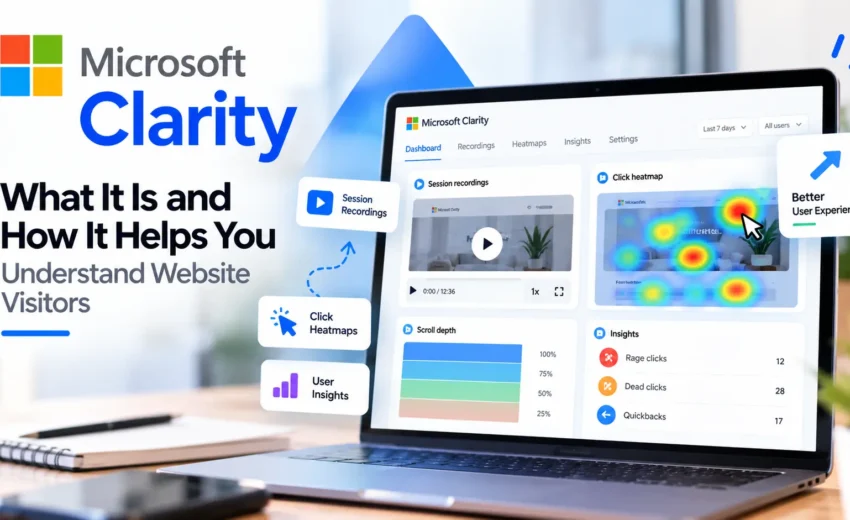
Clarity is a user behavior analytics tool from Microsoft that helps website owners understand how visitors interact with their websites. It provides features such as session recordings, heatmaps, and behavioral insights, and it can also be connected with Google Analytics.
What Is Microsoft Clarity?
Microsoft Clarity is a website analytics and user behavior tool designed to show you more about what visitors do on your website.
Traditional analytics tools are excellent for understanding website traffic and performance. Clarity adds another layer by helping you observe user interactions.
You can use it to understand things such as:
- Where visitors click
- How far they scroll
- How visitors move through a page
- Which parts of a page receive attention
- Where users may experience difficulties
- How different groups of visitors interact with your website
Clarity currently includes session recordings, heatmaps, insights, smart events, filters, and other analysis features.
The main value is simple: Clarity helps you see user behavior instead of relying only on numbers.
Why Is User Behavior Important?
A website can receive plenty of traffic and still have problems.
For example, a landing page might receive visitors from Google Ads, but only a small number of them may submit the enquiry form. Your analytics can show the difference between visitors and conversions, but it may not immediately explain what is happening between those two points.
This is where user behavior data becomes useful.
By looking at recordings and heatmaps, you can investigate whether visitors are reaching important sections, interacting with buttons, scrolling through the content, or leaving before taking the desired action.
Clarity doesn’t automatically tell you why every visitor behaves in a certain way. Instead, it gives you additional information that can help you investigate the problem.
How Does Microsoft Clarity Work?
Clarity collects information about interactions on your website and presents that information through its dashboard.
After setting it up, you can use different Clarity features to study your visitors and specific pages.
The important thing is not to look at everything at once.
Start with a question.
If a page is receiving traffic but not producing enough enquiries, for example, you can use Clarity to investigate that particular page instead of trying to analyze the entire website.
This makes the data much more useful.
What Are Session Recordings?
Session recordings are one of the main features of Microsoft Clarity.
They allow you to review how visitors interact with a website during a session. You can observe actions such as clicks, scrolling, and navigation.
This can help you understand the user journey more clearly.
You may notice that visitors are leaving before reaching an important section, spending time on a particular area, or repeatedly interacting with something that doesn’t work as expected.
Clarity also provides filters that make it easier to find relevant sessions instead of reviewing everything manually.
What Are Clarity Heatmaps?
Heatmaps provide a visual way to understand user interaction on a webpage.
Microsoft Clarity offers different types of heatmaps, including click, scroll, area, and attention heatmaps.
Click Heatmaps
Click heatmaps show where visitors click or tap on a page.
They can help you understand which elements receive interaction and whether users are trying to interact with elements that may not actually be clickable.
Scroll Heatmaps
Scroll heatmaps show how far visitors move down a page.
This can help you understand whether important content is being seen or whether visitors are leaving before reaching certain sections.
However, a lower scroll depth does not automatically mean the content is performing badly. The meaning depends on the purpose and structure of the page.
Attention Heatmaps
Attention heatmaps provide another way to understand which areas of a page receive visitor attention.
Together, these heatmap features can give you a clearer picture of how people interact with different parts of a webpage.
Understanding Rage Clicks, Dead Clicks and Quickbacks
Clarity also provides behavioral insights that can help identify possible user experience problems.
Rage clicks are repeated clicks in a short period of time. They can sometimes indicate frustration or an element that isn’t responding as expected.
Dead clicks occur when a visitor clicks on something, but no expected action takes place.
Quickbacks can show situations where a visitor quickly returns to a previous page after navigating somewhere else.
These signals should not be treated as automatic proof that something is wrong. They are useful indicators that tell you where further investigation may be needed.
Microsoft Clarity and Google Analytics
Microsoft Clarity and Google Analytics can work well together.
Google Analytics is useful for understanding website traffic, acquisition, events, conversions, and other performance data.
Clarity focuses more on user behavior through features such as recordings and heatmaps.
This means you don’t necessarily have to choose between the two.
For example, Analytics may show that a page has a high number of visitors but a low conversion rate. Clarity can then help you investigate how those visitors are interacting with the page.
Microsoft provides an integration between Clarity and Google Analytics, allowing the two tools to be used together.
How Microsoft Clarity Can Help Improve a Website
The real value of Clarity comes from using the information to make better website decisions.
You can use it to investigate:
- Landing page performance
- User navigation
- CTA visibility
- Form interactions
- Mobile user experience
- Content engagement
- Possible usability problems
The process should be simple.
First, identify a problem using your existing website or marketing data. Then use Clarity to understand user behavior around that problem. After that, make a focused improvement and measure the result.
This is more useful than making website changes based only on assumptions.
Can Microsoft Clarity Help With SEO?
Microsoft Clarity is not an SEO ranking tool, and it does not replace Google Search Console or other SEO platforms.
However, it can still be useful for SEO.
Once visitors arrive through organic search, Clarity can help you understand how they interact with your content.
You can see whether visitors scroll through an article, interact with internal links, engage with important sections, or leave the page quickly.
This information can help you improve the user experience of pages that already receive organic traffic.
It is important to understand the difference: Clarity provides user behavior information; it does not directly tell you how to improve your Google rankings.
Can Microsoft Clarity Help With Google Ads and Meta Ads?
Clarity can also be useful when you are sending paid traffic to a website.
If an advertising campaign generates clicks but the website produces fewer leads or sales than expected, there can be several possible reasons.
The problem could be related to the audience, advertisement, offer, landing page, form, or conversion tracking.
Clarity can help you investigate the website experience.
This makes it a useful supporting tool for digital marketers who manage Google Ads, Meta Ads, or other campaigns that send traffic to a website.
What Microsoft Clarity Cannot Tell You
Clarity is useful, but it should not be treated as a tool that automatically explains every problem.
For example, if a visitor leaves a page quickly, you cannot immediately conclude that the page is poor.
They may have found the information they needed, completed another action, or simply had a different reason for leaving.
This is why Clarity should be used together with other information such as Google Analytics, Search Console, advertising data, conversion tracking, and customer feedback.
The goal is to look for patterns rather than make decisions based on one session.
Final Thoughts
Website analytics can tell you a lot about your visitors, but numbers don’t always show the complete picture.
Microsoft Clarity adds another layer by helping you understand how visitors interact with your website through session recordings, heatmaps, and behavioral insights.
It can help you identify possible usability problems, understand how visitors move through your pages, and make more informed decisions about website improvements.
The best approach is not to use Clarity as a replacement for Google Analytics or SEO tools.
Instead, use it alongside them.
Analytics can show you what is happening. Clarity can help you investigate how visitors are behaving. Together, they can give you a clearer understanding of your website and its users.


September 30, 2026