Have you ever landed on a webpage from Google Search and wondered where it fits within a website? Instead of repeatedly clicking your browser’s Back button, you notice a simple navigation trail like this:
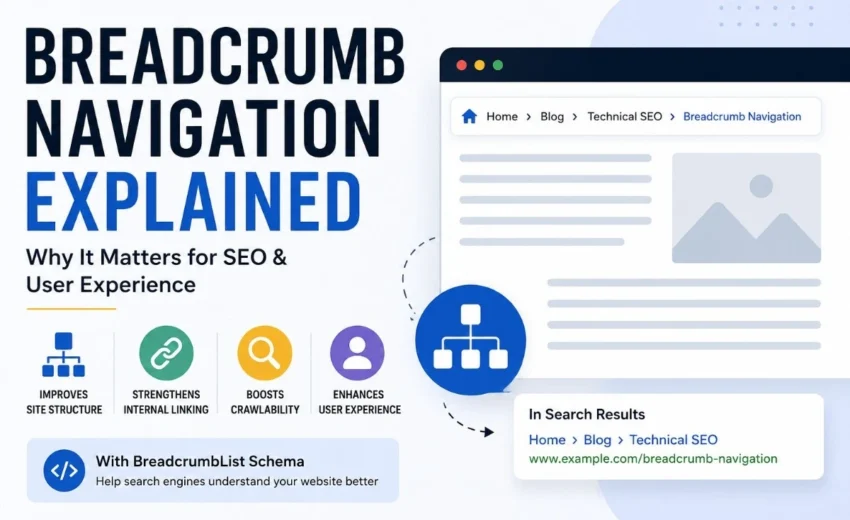
Home → Blog → Technical SEO → Breadcrumb Navigation
That’s called breadcrumb navigation.
Breadcrumb navigation is a secondary navigation system that shows users where they are within a website’s hierarchy. It helps visitors move back to parent categories, discover related content, and better understand how pages are organised.
For search engines like Googlebot and Bingbot, breadcrumbs provide additional internal links that reinforce your website architecture, improve crawlability, and help interpret relationships between pages. When implemented with BreadcrumbList structured data, breadcrumbs also help search engines better understand your site’s hierarchy.
Although breadcrumbs aren’t a direct Google ranking factor, they contribute to a stronger technical SEO foundation by improving navigation, supporting internal linking, and making websites easier to crawl and understand.
In this guide, you’ll learn what breadcrumb navigation is, why it matters for SEO, the different types of breadcrumbs, how to implement them correctly, and the best practices to follow.
Key Takeaways
- Breadcrumb navigation helps users understand where they are within a website.
- It strengthens internal linking and reinforces website architecture.
- Breadcrumbs improve crawlability and user experience but aren’t a direct Google ranking factor.
- BreadcrumbList structured data helps search engines understand your website hierarchy.
- Hierarchy-based breadcrumbs are the best choice for most websites.
What Is Breadcrumb Navigation?
Breadcrumb navigation is a secondary navigation trail that shows a page’s position within a website’s hierarchy.
For example:
Home → Services → SEO → Technical SEO
Each breadcrumb, except the current page, is usually clickable, allowing visitors to return to broader categories without repeatedly using the browser’s Back button.
The name comes from the fairy tale Hansel and Gretel, where breadcrumbs were dropped to mark a path home. Websites use the same concept to help visitors understand where they are and how they reached a particular section.
Unlike a primary navigation menu, breadcrumbs don’t display every section of your website. Instead, they focus on showing the hierarchical relationship between pages.
For example, imagine someone searches Google for “Technical SEO Checklist” and lands directly on your article. Instead of leaving your website after reading, they can click the Technical SEO category in the breadcrumb trail to discover more related guides. This creates a smoother browsing experience and encourages visitors to explore additional content.
Why Breadcrumb Navigation Matters for SEO
Breadcrumbs don’t directly improve search rankings, but they offer several indirect SEO benefits that improve both user experience and search engine understanding.
Improve Website Architecture
Breadcrumbs clearly show the relationship between parent and child pages.
For example:
Home → Blog → Technical SEO → Breadcrumb Navigation
This hierarchy helps search engines understand how your content is organised, making it easier to interpret your website structure.
A logical website architecture also makes navigation simpler for visitors.
Strengthen Internal Linking
Every breadcrumb creates additional internal links.
These links distribute link equity across your website while reinforcing important category and parent pages.
For example, every article in your Technical SEO category can automatically link back to that category page through breadcrumbs, strengthening your internal linking strategy without requiring extra manual links.
Improve Crawlability
Search engines primarily discover webpages by following internal and external links, while XML sitemaps, backlinks, and other discovery methods provide additional signals.
Breadcrumbs create extra navigation paths that help Googlebot crawl your website more efficiently, especially on websites with multiple categories and nested content.
Although an XML sitemap helps search engines discover pages, breadcrumbs provide valuable contextual links that explain how those pages fit within your website.
Better User Experience
Many visitors don’t enter your website through the homepage.
Instead, they arrive directly from Google Search, social media, or backlinks.
Breadcrumbs immediately show visitors where they are and provide an easy way to explore broader categories without relying on the browser’s Back button.
For example, on an online clothing store, a customer might land on a product page from Google.
Hierarchy-based breadcrumb:
Home → Men’s Clothing → Jackets → Waterproof Jacket
Instead of leaving the website, they can simply click Men’s Clothing or Jackets to browse similar products.
This encourages visitors to continue exploring your website.
Help Search Engines Understand Your Website
When BreadcrumbList structured data is implemented correctly, Google can better understand your website’s hierarchy and the relationships between pages.
In some search experiences, Google may display a simplified URL path that reflects your website structure, helping users understand where a page belongs before clicking.
Types of Breadcrumb Navigation
Different websites use different breadcrumb styles depending on their structure and purpose.
Hierarchy-Based Breadcrumbs
Hierarchy-based breadcrumbs reflect your website’s structure.
Example:
Home → Blog → SEO → Technical SEO
This is the most common type and works well for blogs, business websites, educational websites, and most content-driven sites.
Attribute-Based Breadcrumbs
Attribute-based breadcrumbs are commonly used on eCommerce websites.
They display selected product categories or attributes rather than just the website hierarchy.
Example:
Home → Shoes → Running Shoes → Men’s
These breadcrumbs help shoppers understand the product category or filters they’re viewing.
History-Based Breadcrumbs
History-based breadcrumbs display the user’s browsing history.
Example:
Home → Search Results → Product Page
Since modern browsers already provide Back and Forward buttons, this type is less common and offers limited SEO value compared to hierarchy-based breadcrumbs.
Breadcrumb Navigation vs Internal Links
Breadcrumbs and internal links work together, but they serve different purposes.
Breadcrumb Navigation | Internal Links |
Shows a page’s position within the website hierarchy | Connects related pages contextually |
Helps users navigate back to parent pages | Helps users discover relevant content |
Usually appears near the top of the page | Appears naturally within page content |
Reinforces site architecture | Distributes contextual relevance and link equity |
For example, a breadcrumb might display:
Home → Blog → Technical SEO → Canonical Tags
Within that same article, contextual internal links might point readers to related guides on 301 Redirects, Meta Robots Tags, or Orphan Pages.
Together, they create a stronger navigation and internal linking strategy.
Breadcrumb Schema: Why It Matters
Displaying breadcrumbs helps users, but adding BreadcrumbList structured data helps search engines understand them more accurately.
Breadcrumb schema uses Schema.org’s BreadcrumbList type, typically implemented using JSON-LD. Each breadcrumb is represented as a ListItem containing its position, name, and URL, allowing search engines to understand the hierarchy of your website.
If you use WordPress, plugins such as Rank Math, Yoast SEO, and All in One SEO automatically generate breadcrumb schema, making implementation straightforward.
After setup, validate your structured data using Google Rich Results Test and monitor any issues in Google Search Console.
Common Breadcrumb SEO Mistakes
Avoid these common mistakes:
- Using breadcrumbs that don’t match your website hierarchy.
- Replacing your primary navigation with breadcrumbs.
- Forgetting to implement BreadcrumbList structured data.
- Making the current page clickable.
- Displaying inconsistent breadcrumb paths across different sections of your website.
- Failing to review breadcrumb navigation after a website redesign or category restructuring.
During website redesigns, category names or page structures often change. If breadcrumb trails aren’t updated accordingly, they can become inconsistent with the site’s actual architecture, confusing both users and search engines.
Best Practices
Follow these best practices to maximise the SEO benefits of breadcrumb navigation:
- Use hierarchy-based breadcrumbs for most websites.
- Place breadcrumbs near the top of every page.
- Keep breadcrumb labels short, descriptive, and consistent.
- Ensure breadcrumb paths accurately reflect your website hierarchy.
- Implement BreadcrumbList structured data.
- Combine breadcrumbs with a strong internal linking strategy.
- Validate structured data using Google Rich Results Test.
- Review breadcrumb navigation after website redesigns, migrations, or taxonomy changes.
Breadcrumbs are most valuable for websites with multiple categories, nested pages, or large product catalogues. Smaller websites with only a few pages may not need breadcrumb navigation because their structure is already simple and easy to navigate.
Final Thoughts
Breadcrumb navigation is a simple feature that delivers significant benefits for both users and search engines. It improves navigation, reinforces website architecture, strengthens internal linking, and helps search engines understand how your content is organised.
Although breadcrumbs aren’t a direct ranking factor, they contribute to better crawlability, improved user experience, and a stronger technical SEO foundation. When combined with BreadcrumbList structured data, they help search engines interpret your site’s hierarchy more effectively.
Whether you manage a blog, business website, or eCommerce store, implementing breadcrumb navigation is a simple improvement that makes your website easier to navigate and maintain as it grows. Combined with a well-planned internal linking strategy, XML sitemaps, and regular technical SEO audits, breadcrumbs help create a website that’s easier for both users and search engines to understand.
Alfik P S
hi