Not every page on your website needs to appear in Google Search. Pages like login screens, shopping carts, thank-you pages, and internal search results are useful for visitors but rarely provide value to people searching online.
This is where Meta Robots Tags become important.
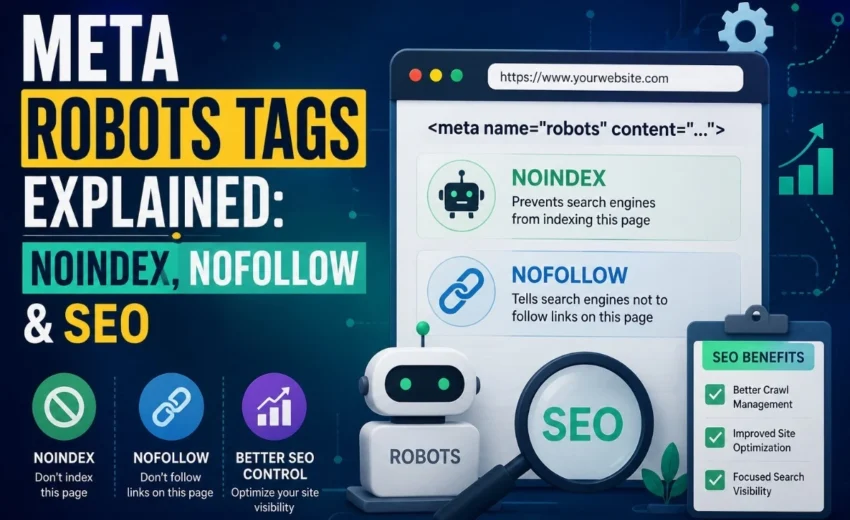
A Meta Robots Tag tells search engines such as Googlebot and Bingbot how to treat an individual webpage after crawling it. Depending on the directives you use, you can prevent a page from appearing in search results, control whether search engines follow its links, or manage how the page is displayed.
Although Meta Robots Tags are just a small piece of HTML code, they play a significant role in technical SEO, helping search engines understand which pages should be indexed and which should remain hidden.
In this guide, you’ll learn what Meta Robots Tags are, how they work, the most important directives, common mistakes to avoid, and best practices for managing your website’s indexing.
What Are Meta Robots Tags?
A Meta Robots Tag is an HTML tag placed inside the <head> section of a webpage. It provides page-level instructions to search engines about how that specific page should be handled.
A basic example looks like this:
<meta name=”robots” content=”noindex, follow”>
In this example:
- noindex tells search engines not to include the page in search results.
- Follow allows search engines to continue crawling the links on that page.
Unlike robots.txt, which controls crawling across an entire website, Meta Robots Tags apply only to individual pages. This gives website owners much greater control over what appears in search engines.
Why Meta Robots Tags Matter for SEO
Not every page deserves to rank in Google.
Pages such as checkout screens, account dashboards, duplicate pages, or internal search results can clutter your website’s index and reduce crawl efficiency.
For example, imagine you have a thank-you page that visitors see after submitting a contact form. It serves an important purpose, but there’s little reason for someone to find it through Google Search. Adding a noindex directive prevents the page from appearing in search results while still allowing users to access it after submitting the form.
Using Meta Robots Tags correctly helps search engines spend more time crawling and indexing your valuable pages instead of low-value content.
The Most Important Meta Robots Directives
Although several directives are available, most websites rely on four primary ones.
index
The index directive allows search engines to include a page in their search index.
In most cases, you don’t need to specify it because index is the default behavior. Your homepage, blog posts, service pages, and product pages should normally remain indexable.
noindex
The noindex directive tells search engines not to include a page in search results.
Common uses include:
- Login pages
- Thank-you pages
- Shopping cart pages
- Customer account areas
- Internal search results
- Duplicate content
One common mistake occurs after a website migration. Developers sometimes forget to remove noindex tags that were used on a staging website, causing important pages to disappear from Google Search. Always check your indexing settings before launching a redesigned website.
follow
The follow directive tells search engines they can continue crawling the links found on a page.
Even if a page uses noindex, allowing search engines to follow its internal links helps them discover other valuable pages across your website.
nofollow
The nofollow directive tells search engines that you don’t want to endorse the outgoing links on a page.
Today, Google generally treats nofollow as a hint rather than a strict directive. It may still crawl certain links if it considers them useful.
This directive is commonly used for:
- User-generated content
- Untrusted external links
- Sponsored or paid content
For internal navigation, nofollow is usually unnecessary because it can make it harder for search engines to understand your website structure.
Meta Robots Tags vs Robots.txt
Many website owners confuse Meta Robots Tags with robots.txt, but they serve different purposes.
Meta Robots Tags | robots.txt |
Controls indexing | Controls crawling |
Applies to individual pages | Applies to the whole website or directories |
Added inside the HTML | Stored in the website’s root directory |
A simple way to remember the difference is:
- robots.txt tells search engines whether they can crawl a page.
- Meta Robots Tags tell search engines what to do after they’ve crawled the page.
If your goal is to remove a page from Google Search, don’t block it in robots.txt. Google needs to crawl the page to see the noindex directive.
Common Meta Robots Tag Mistakes
Even small configuration mistakes can create indexing problems.
Avoid these common errors:
- Leaving noindex enabled after launching a new website.
- Blocking a page in robots.txt while also adding a noindex tag.
- Using nofollow on important internal links.
- Including noindex pages in your XML sitemap.
- Sending conflicting signals through canonical tags, sitemaps, and Meta Robots directives.
Keeping your indexing signals consistent helps search engines understand your website more effectively.
Best Practices
Follow these recommendations for a healthy indexing strategy:
- Use noindex only for pages that shouldn’t appear in search.
- Keep important pages indexable.
- Remove noindex pages from your XML sitemap.
- Allow Google to crawl pages containing a noindex directive.
- Audit your Meta Robots settings after website redesigns or migrations.
- Use tools like Google Search Console, Screaming Frog SEO Spider, or Semrush Site Audit to identify indexing issues.
Regular technical SEO audits can prevent accidental indexing problems before they affect your organic traffic.
Final Thoughts
Meta Robots Tags are a small but essential part of technical SEO. They help search engines understand which pages should appear in search results and which should remain hidden. By using directives such as index, noindex, follow, and nofollow correctly, you can improve crawl efficiency, avoid unnecessary indexing, and keep your website organised for both users and search engines.
Remember that Meta Robots Tags control indexing, while robots.txt controls crawling. Used alongside XML sitemaps, canonical tags, 301 redirects, and a strong internal linking strategy, they form an important foundation for long-term SEO success.
Before making major website changes, always review your Meta Robots settings using Google Search Console or your preferred SEO audit tool. A simple indexing mistake can prevent valuable pages from appearing in search results, while the correct implementation helps search engines focus on the content that matters most.
Alfik P S
hi
404 vs 410 Errors: What’s the Difference and...