
Every website owner runs into missing pages. Whether you deleted an old blog post, discontinued a product, or restructured your site, you eventually have to decide how to handle URLs that no longer exist.
By default, most web servers return a 404 error when a requested page cannot be found. But there is another option called a 410 response.
While both indicate that a page is unavailable, they send different signals to search engines such as Google and Bing about why the page is no longer accessible. Choosing the wrong one can waste your crawl budget. Crawl budget refers to the number of pages Googlebot is willing to crawl on your website within a given period. The more efficiently you manage it, the better your important content gets discovered and indexed.
So, when should you use a 404 page, and when is a 410 status the better choice? Let’s break it down in plain terms.
What Exactly Is a 404 Error?
A 404 response is the default answer when a server cannot locate a specific page.
Think of it as a polite way of saying, “We looked for this page, but we couldn’t find it.”
The key thing to understand is that a 404 does not explain why the page is missing. It could be missing for several reasons:
- The URL was typed incorrectly by the user.
- The page was moved or deleted without setting up a redirect.
- The page never existed in the first place.
- A broken link from another site points to the wrong address.
Because a 404 is neutral and passive, search engines do not know if the page is coming back. They will usually keep checking the URL for a while before eventually removing it from their index.
What Exactly Is a 410 Error?
A 410 Gone status is more specific. It tells the browser and search engines: “This page used to exist, but we removed it on purpose, and it is never coming back.”
It is a deliberate and final statement.
You would typically use a 410 in situations where you are entirely certain the content is dead and there is no future plan to revive it. Common examples include:
- Permanently discontinued products or services.
- Expired seasonal landing pages or promotional offers.
- Content removed for legal or compliance reasons.
- Spammy pages or low-quality content you have cleaned up.
By returning a 410 response, you are taking responsibility for the removal instead of leaving search engines guessing.
The Core Difference in One Sentence
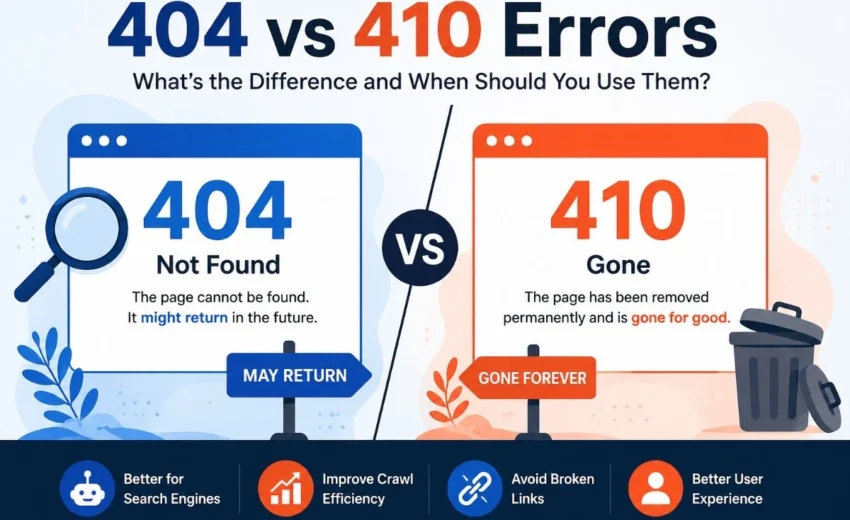
A 404 page says, “I do not know where this page is,” while a 410 response says, “I removed this page on purpose, and it is gone for good.”
That difference in intent is what guides your decision. Here is a quick comparison to make it even clearer:
Feature | 404 Error | 410 Error |
Meaning | Page cannot be found | Page permanently removed |
May return | Yes | No |
Search engine signal | Missing page | Gone forever |
Best for | Unknown or accidental removals | Permanent removals |
When Should You Use a 404 Error?
A 404 response is the safest choice when the future of a page is uncertain.
You should return a 404 page when:
- A user mistypes a URL (this is normal and unavoidable).
- A page is temporarily removed but might return later.
- You are unsure whether a page will be recreated or repurposed.
- The page was deleted by accident, and you plan to restore it.
In these cases, a 404 keeps the door open. Search engines will check back occasionally, which is useful if the content goes live again.
When Should You Use a 410 Error?
A 410 status is the better choice when you are making a deliberate, permanent decision.
You should return a 410 response when:
- You have permanently removed a product or service with no replacement.
- You are cleaning up thin or outdated content that will never be rewritten.
- You need to remove a page for legal reasons.
- You want to tell search engines to stop wasting time crawling that URL.
Returning a 410 is a clear signal that you know exactly what you are doing. It tends to speed up the removal process from search results, which is especially helpful for large websites.
What About 301 Redirects?
A common question is where 301 redirects fit into this picture.
If a page no longer exists but you have a similar or updated page that covers the same topic, you should use a 301 redirect. This helps consolidate ranking signals, including backlinks, from the old URL to the new one.
However, you should never redirect a deleted page to your homepage just because you do not know what else to do. That creates a poor user experience. Google may treat these redirects as Soft 404s because users don’t reach content that matches their original intent.
Here is a real-world example:
If you rename a guide from /seo-basics to /technical-seo-guide, use a 301 redirect so visitors and search engines automatically reach the updated page. If you permanently remove an old event page with no replacement, returning a 410 is usually more appropriate than redirecting it to your homepage.
The rule is simple:
- If there is a relevant replacement → use a 301.
- If there is no replacement, but the page might return → use a 404.
- If there is no replacement and it is gone permanently → use a 410.
How Does Google Treat 404 and 410 Errors?
There is a popular myth that using a 410 will instantly boost your rankings. That is not true.
Google has made it clear that both status codes ultimately lead to the same outcome: the URL gets removed from the index over time.
However, the difference lies in speed. Because Google receives a stronger signal that the page will not return when it sees a 410, it may reduce future crawl requests for that URL sooner. On large websites, this can help Google spend more of its crawl budget discovering and refreshing important pages. For smaller sites, this difference is barely noticeable, but for large e-commerce stores or content-heavy platforms, using 410s strategically can make a real difference in how efficiently Google crawls your site.
Common Mistakes to Avoid
Even experienced site owners make these errors. Here is what to watch out for:
- Redirecting every missing page to the homepage
This is one of the most common mistakes. It does not help users, and it wastes the link value of the old page. Only redirect when the destination is genuinely relevant. - Leaving broken internal links
If you delete a page, update your internal navigation, footer links, and related posts. Broken links frustrate visitors and create a poor user experience. - Keeping deleted URLs in your XML sitemap
Your sitemap should only contain live, indexable pages. Leaving deleted URLs in the sitemap sends mixed messages to search engines. - Blocking missing pages in robots.txt
Some people try to hide missing pages from Google using robots.txt. This is a bad idea. If Google cannot access the URL, it cannot see that you are returning a 404 or 410, and it may keep the page in the index longer.
Best Practices for Handling Removed Pages
To keep your site healthy and your rankings stable, follow these straightforward practices:
- Monitor your errors regularly. Use the URL Inspection Tool in Google Search Console to check how Google sees a deleted page and whether it has already been removed from the index. This gives you direct insight into how search engines interpret your status codes.
- Build a useful custom 404 page. A helpful 404 page should clearly explain that the requested content isn’t available while offering navigation, a search bar, and links to important sections of your website.
- Remove deleted URLs from your sitemap. After you delete a page and set the status code, ensure it is no longer listed in your XML sitemap.
- Audit your site periodically. Tools like Screaming Frog or Ahrefs can help you find broken links and missing pages across your entire website.
- Create a redirect map before site migrations. If you are redesigning your site or changing URL structures, plan. Decide in advance which URLs will be redirected and which will return a 404 or 410.
Final Thoughts
Both 404 errors and 410 responses are useful HTTP status codes, but they serve different purposes.
A 404 page is your default option when you are unsure about the future of a page. A 410 status is your clear, confident choice when you know a page is gone forever. Neither will hurt your rankings on their own, but using them correctly helps search engines understand your site better, improves user experience, and keeps your technical foundation strong.
The next time you delete a page, take a moment to ask yourself: Is this temporary or permanent? Your answer will tell you exactly which status code to use.
Alfik P S
hi