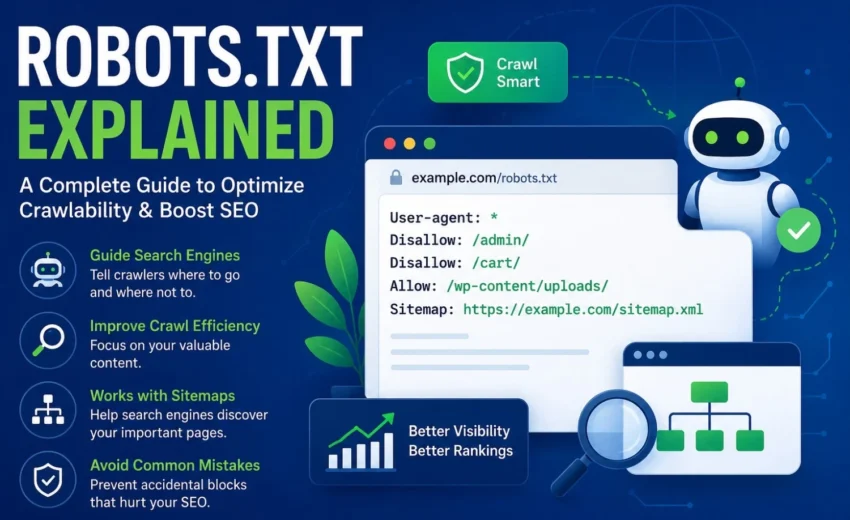

Your website might have hundreds or even thousands of pages, but not every one needs to be crawled by search engines. Login pages, shopping carts, admin areas, and staging environments rarely add value in search results. That’s where a robots.txt file becomes essential.
Despite being just a small text file, robots.txt plays a crucial role in guiding search engine crawlers. It tells them which parts of your site to look at and which to ignore. A properly set up robots.txt file improves crawl efficiency, reduces server load, and helps search engines focus on your most important content.
At the same time, robots.txt is often misunderstood. Many website owners think it can hide pages from Google or protect sensitive data. In reality, it only controls crawling – not indexing, and certainly not security.
Key Takeaways
- Robots.txt tells crawlers which URLs or directories they can or cannot access.
- It follows the Robots Exclusion Protocol (REP), which is respected by major search engines.
- Robots.txt controls crawling, not indexing.
- The file must be placed in your website’s root directory.
- Never rely on robots.txt to protect sensitive information – it’s publicly visible.
- Incorrect rules can accidentally block your most important pages from search engines.
What Is a Robots.txt File?
A robots.txt file is a plain-text document placed in the root folder of your website. When a search engine bot arrives at your site, it first looks for this file to understand which areas it may crawl and which it should skip.
The file lives at: https://yourdomain.com/robots.txt
Think of it as a set of signs for crawlers – mostly telling them where not to go.
It’s important to know that robots.txt is a voluntary standard. Well-behaved bots follow it, but malicious scrapers and spam bots often ignore it. That’s why you should never treat it as a security measure.
Why Robots.txt Matters for SEO
Search engines have a limited “crawl budget” – the number of pages they can fetch from your site in a given time. On large websites, this budget is precious. A good robots.txt file helps by:
- Preventing crawlers from wasting time on low-value pages
- Reducing duplicate content crawling
- Helping search engines focus on the content that actually matters
- Lowering server load caused by unnecessary bot requests
Robots.txt doesn’t directly boost your rankings, but it supports your technical SEO by making crawling more efficient.
How Robots.txt Works
When a crawler visits your site, it requests the robots.txt file, reads the rules that apply to its user agent, determines which URLs are allowed or disallowed, and then crawls only the permitted pages.
For example, if your file says:
text
User-agent: *
Disallow: /admin/
Compliant crawlers will skip everything inside the /admin/ folder. But this doesn’t mean those pages disappear from Google – it just means the bot won’t access their content.
Robots.txt Controls Crawling, Not Indexing
This is the most common misunderstanding. Many site owners add:
text
User-agent: *
Disallow: /private/
and expect the page to vanish from Google. It won’t. If Google discovers that URL through other means – like external links or a sitemap – it may still show it in search results, though with a limited snippet.
To truly prevent indexing, use:
- Meta robots noindex (but only if the page can be crawled)
- X-Robots-Tag HTTP header
- Password protection or authentication
- Simply remove the page if it’s no longer needed
Remember: robots.txt controls access, not inclusion in search results.
Robots.txt vs XML Sitemap
A common confusion is that robots.txt and XML sitemaps do the same job. They don’t.
- Robots.txt tells crawlers what not to crawl.
- An XML sitemap tells crawlers about the important URLs they should discover.
They work together: you might block /wp-admin/ in robots.txt while including your product and blog pages in the sitemap.
The Main Directives
User-agent
Specifies which bot the rules are for. Use * for all bots, or target specific ones like Googlebot, Bingbot, or GPTBot.
Disallow
Tells bots to avoid a certain path. Example: Disallow: /cart/.
Allow
Overrides a broader Disallow. Example: you might block /images/ but allow /images/logo.png.
Sitemap
Points to your XML sitemap. Example: Sitemap: https://domain.com/sitemap.xml.
Crawl-delay
Requests a pause between requests – but Google ignores it. Use Google Search Console for crawl rate management.
Wildcards
Use * and $ for pattern matching. For instance, Disallow: /*.pdf$ blocks all PDF files.
Best Practices for an SEO-Friendly Robots.txt
- Keep it simple – avoid complex rules unless absolutely needed.
- Place the file in the root directory.
- Include your sitemap URL.
- Block only pages that have no search value (admin, cart, checkout, etc.).
- Don’t block CSS/JS – there’s no benefit.
- Review the file after every major website update.
- Test thoroughly using Google Search Console or third-party crawlers.
Which Pages Should You Block?
Block these:
- Admin areas (/wp-admin/, /admin/)
- Shopping cart and checkout
- User account pages
- Internal search results
- Temporary or staging folders
Do not block:
- Blog posts, product pages, category pages
- Landing pages and main content
- Public resources (images, CSS, JS)
Use your judgment based on your site structure.
How to Test Your Robots.txt File
Direct view – open https://yourdomain.com/robots.txt in a browser.
Google Search Console – use the robots.txt tester and URL inspection tool.
SEO crawlers – tools like Screaming Frog, Semrush, or Ahrefs can flag issues.
Always test before deploying to production.
Final Thoughts
Robots.txt may be tiny, but its impact on your site’s crawlability is significant. When used correctly, it guides search engines toward your valuable content and away from the clutter. Yet it’s not a magic bullet – it doesn’t control indexing, and it’s not a security tool.
For most websites, a clean and simple robots.txt file – with a sitemap reference, a few well-chosen disallow rules, and no unnecessary blocks – is all you need. Regularly review it, test changes, and keep it aligned with your overall SEO strategy.
Combine it with a solid XML sitemap, smart internal linking, and quality content, and you’ll have a strong foundation for long-term organic growth.
Alfik P S
hi