Not everyone who visits your website or interacts with your Facebook and Instagram ads will become a customer immediately. Some people need more time to compare options, understand your services, or make a purchase decision.
This is where Meta retargeting becomes useful.
Meta retargeting helps businesses show relevant ads to people who have already interacted with their brand. Instead of focusing only on reaching new audiences, businesses can reconnect with people who have previously shown interest in their products or services.
In this guide, we will explore how Meta retargeting works, how to set it up, and how businesses can use it to improve their advertising results.
What Is Meta Retargeting?
Meta retargeting is an advertising strategy that allows businesses to reach people who have previously interacted with their business through Facebook, Instagram, their website, or other eligible sources.
These audiences are generally created using Meta Custom Audiences.
For example, someone may visit your website, view a product, watch your Instagram video, or engage with your Facebook page without enquiring. Retargeting allows you to show relevant ads to eligible people from these audiences.
The goal is to remind potential customers about your business and encourage them to take the next step.
How Does Meta Retargeting Work?
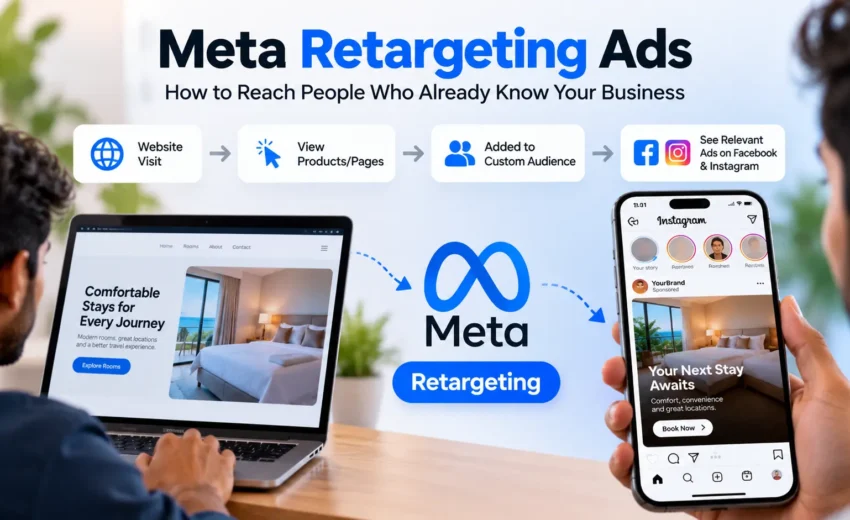
Meta retargeting works by creating audiences from previous interactions and using those audiences in advertising campaigns.
The process generally follows these steps:
- A person interacts with your business through your website, social media content, or another supported source.
- Meta receives or matches eligible interaction data, depending on the source and tracking setup.
- You create a Custom Audience based on the available data.
- You use that audience when setting up your advertising campaign.
- Your ads can reach eligible people from that audience, subject to campaign settings, audience availability, and Meta’s advertising policies.
Retargeting does not guarantee that every person in your audience will see your ad. Delivery depends on factors such as audience size, budget, competition, and campaign settings.
Types of Meta Retargeting Audiences
Meta offers different Custom Audience sources, allowing businesses to reconnect with people based on their previous interactions.
1. Website Visitors
Businesses can create audiences from website activity using the Meta Pixel and, where appropriate, Conversions API.
Depending on the tracking setup, you may be able to create audiences of people who visited specific pages, viewed products, or completed certain actions.
For example, an online store may retarget eligible visitors who viewed a product but did not purchase it.
2. Facebook and Instagram Engagement
You can create audiences from people who interacted with your Facebook Page, Instagram professional account, videos, lead forms, or other supported Meta assets.
This is useful for businesses that receive engagement on social media but have not yet converted those interactions into enquiries or sales.
3. Customer Lists
Businesses can upload eligible customer information, such as email addresses or phone numbers, to create a Custom Audience.
Meta attempts to match the information with accounts on its platforms. Matching is not guaranteed, and businesses must follow applicable privacy requirements, consent obligations, and Meta’s terms when using customer data.
4. Lead Form Engagement
If you use Meta Instant Forms, you can build audiences based on eligible interactions with those forms.
For example, you may want to reconnect with people who opened a lead form but did not submit it, where that audience option is available.
You can also create audiences from people who previously submitted a form, depending on your campaign objective and available options.
How to Set Up Meta Retargeting Ads
Setting up a retargeting campaign involves preparing your audience, choosing the right campaign objective, and creating an ad that matches the audience’s previous interaction.
Step 1: Choose Your Audience Source
Open Meta Ads Manager and navigate to the Audiences section. Create a Custom Audience and select an appropriate source, such as website activity, Instagram account engagement, Facebook Page engagement, or a customer list.
The available sources depend on your account setup and the assets you manage.
Step 2: Configure Your Custom Audience
Choose the relevant audience criteria. For website retargeting, this may involve selecting visitors to specific pages or people who completed certain events.
You can also set an audience retention period where supported. A shorter period generally focuses on more recent interactions, while a longer period can include people who interacted with your business further in the past.
Choose a period that matches your sales cycle and audience size.
Step 3: Select Your Campaign Objective
Choose a campaign objective that aligns with the result you want, such as leads, sales, or engagement.
Your objective should reflect the action you want people to take, rather than simply the fact that they have seen your business before.
Step 4: Select the Retargeting Audience
At the ad set level, select your prepared Custom Audience where the campaign setup allows it.
Review your audience settings and exclusions. For example, if your goal is to generate purchases, you may exclude recent purchasers where appropriate and supported by your data.
Be aware that some campaign types use Advantage+ audience features or other audience controls that can affect how audience suggestions and restrictions work.
Step 5: Create Relevant Ad Creative
Your ad should relate to the audience’s previous interaction and give people a clear reason to return.
Use a strong headline, a clear message, and a suitable call to action. Avoid repeating the same creative for too long without reviewing its performance.
Step 6: Review and Publish
Before publishing, check your audience, budget, placements, creative, destination URL, and tracking setup.
After the campaign begins, allow sufficient time and data for evaluation. Make adjustments based on meaningful performance trends rather than reacting to every short-term fluctuation.
How to Improve Meta Retargeting Performance
Creating a retargeting audience is only the first step. The campaign also needs a relevant message and a clear conversion goal.
- Match the Ad to the Audience
Someone who viewed a product may need different information from someone who already submitted an enquiry. Tailor your message to the interaction and the next action you want them to take.
- Use Appropriate Audience Windows
Recent visitors may have stronger purchase intent than people who interacted with your business several months ago. Test audience retention periods based on your sales cycle and available audience size.
- Exclude Converted Customers When Appropriate
If you are trying to generate first-time purchases or enquiries, consider excluding people who have already completed the desired action. For repeat purchases or upselling, a separate campaign may be more suitable.
- Refresh Your Creatives
Repeatedly showing the same ad can lead to creative fatigue. Monitor frequency, click-through rate, conversion rate, and cost trends to determine whether a creative refresh is needed.
- Make the Next Step Clear
Use a relevant call to action, such as requesting a quotation, completing an enquiry, or purchasing a product. Ensure the landing page or form supports the promise made in the ad.
Meta Pixel and Conversions API for Website Retargeting
The Meta Pixel is a browser-based tool that helps businesses measure website activity and supports audience creation and conversion tracking.
Conversions API allows supported data to be sent from a business’s server or other integrations to Meta. When configured correctly, it can complement browser-based tracking and improve measurement resilience.
For website retargeting, make sure the relevant events are configured correctly and that your data collection complies with applicable privacy laws and consent requirements.
Tracking is not always complete. Browser restrictions, consent choices, technical issues, and matching limitations can affect the data available for measurement and audience creation.
Common Meta Retargeting Mistakes
Some common mistakes can reduce campaign effectiveness:
- Using audiences that are too small: A very limited audience may restrict delivery and make results inconsistent.
- Showing irrelevant ads: The creative should connect with the audience’s previous interaction.
- Ignoring exclusions: Continuing to show acquisition ads to recent converters may waste budget.
- Overlooking tracking problems: Incorrect Pixel events or incomplete setup can affect audience creation and reporting.
- Running the same creative for too long: Monitor performance and refresh ads when the data indicates a decline.
- Measuring only clicks: Evaluate qualified leads, purchases, cost per result, and revenue where available.
Avoid making decisions based on a single metric. A campaign that generates inexpensive clicks may still perform poorly if those clicks do not lead to meaningful business outcomes.
How to Measure Meta Retargeting Success
The right metrics depend on your campaign objective.
For lead generation campaigns, monitor the number of leads, cost per lead, lead quality, and the percentage of leads that become customers.
For sales campaigns, review purchases, cost per purchase, conversion value, and return on ad spend where reliable revenue data is available.
You can also monitor reach, frequency, click-through rate, and landing page activity to understand how people interact with your ads.
Compare retargeting performance with your broader campaign results, but remember that attribution does not always prove that an ad directly caused a conversion. Use available reporting alongside your sales or CRM data for a more complete picture.
Final Thoughts
Meta retargeting gives businesses another opportunity to connect with people who have already shown interest in their products or services. By creating relevant Custom Audiences, choosing suitable campaign objectives, and delivering useful messages, businesses can encourage potential customers to take the next step.
However, successful retargeting requires more than showing ads to previous visitors. Accurate tracking, appropriate audience selection, relevant creatives, and consistent performance analysis all play an important role.
The goal is not simply to reach people again. It is to make the next interaction more relevant and valuable.


October 20, 2026