Choosing the right keywords is only half the battle when running a successful Google Ads campaign. The other half is deciding how Google should match those keywords with what people actually search for.
That’s where keyword match types come in.
The match type you assign to a keyword determines when your ad becomes eligible to appear in Google Search. It directly influences how many people see your ads, how relevant those visitors are, and how efficiently you spend your advertising budget.
Google Ads currently offers three keyword match types: Broad Match, Phrase Match, and Exact Match. Each one has its own purpose, and understanding the differences can help you attract more qualified traffic while reducing wasted clicks.
In this guide, we’ll explain how each match type works, when to use it, and how to choose the right one for your campaigns.
Key Takeaways
Google Ads offers three keyword match types: Broad Match, Phrase Match, and Exact Match.
Broad Match helps you reach a wider audience and discover new search opportunities.
Phrase Match balances reach with relevance, making it a good choice for many businesses.
Exact Match provides greater control over who sees your ads.
Regularly reviewing your Search Terms Report and adding Negative Keywords can improve campaign performance and reduce wasted ad spend.
What Are Google Ads Match Types?
Keyword match types are settings that tell Google how closely a user’s search query should match your chosen keyword before your ad is eligible to appear.
For example, imagine you run a taxi service and bid on the keyword Kerala Taxi Service. Someone might search for taxi booking in Kerala, airport taxi Kochi, or cab service in Kerala.
Whether your ad appears for those searches depends largely on the match type you’ve selected.
It’s also important to understand that Google no longer matches keywords word for word. Instead, it looks at the meaning and intent behind a search. This includes close variants such as misspellings, singular and plural forms, reordered words, and similar phrases when they have the same intent.
Broad Match
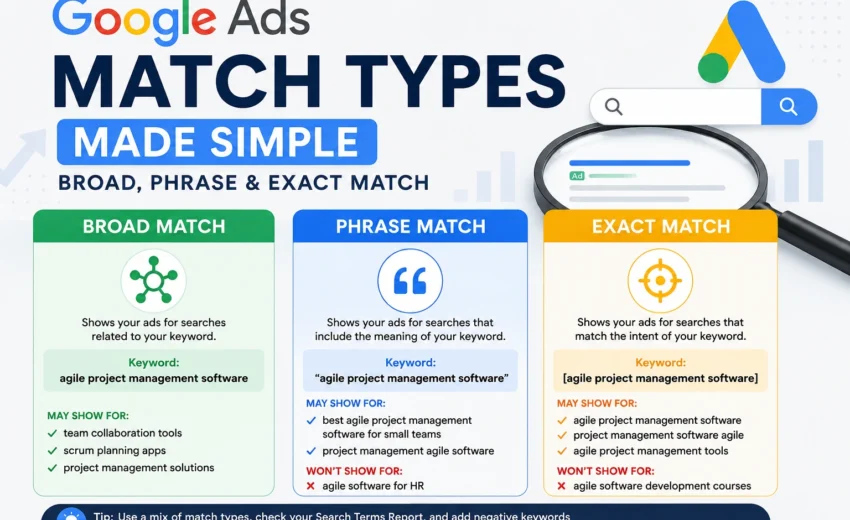
Broad Match is the default keyword match type in Google Ads. It gives your ads the widest possible reach by allowing Google to match your keyword with searches it considers relevant.
Rather than looking only at the exact words you’ve entered, Google uses machine learning to understand the meaning behind a search and decide whether your ad should appear.
Example
If your keyword is agile project management software, your ad could appear for searches like:
Team collaboration tools
Scrum planning apps
Project management platform
Even though those searches don’t contain your exact keyword, Google may consider them closely related.
When Should You Use Broad Match?
Broad Match is useful when you’re launching a new campaign or entering a new market. It can uncover valuable search terms that you may not have considered during keyword research and help you understand how potential customers search for your products or services.
However, Broad Match requires regular monitoring. Without a good list of Negative Keywords and ongoing optimisation, your ads may appear for searches that aren’t relevant to your business.
Google generally recommends using Broad Match alongside Smart Bidding strategies such as Maximize Conversions or Target CPA, allowing its machine learning to optimise bids based on conversion data.
Phrase Match
Phrase Match provides a balance between reach and control.
It allows Google to show your ad for searches that have the same meaning as your keyword, even if additional words appear before, after, or within the phrase.
Example
If your keyword is agile project management software, your ad may appear for searches like:
However, searches with a different intent—such as agile software development courses—are much less likely to trigger your ad.
When Should You Use Phrase Match?
For many advertisers, Phrase Match is the best starting point. It provides enough flexibility to reach new customers while maintaining better relevance than Broad Match.
It’s particularly effective for local businesses, service providers, and lead generation campaigns where controlling search intent is important.
Exact Match
Exact Match gives you the greatest control over your targeting.
Although the name suggests an identical keyword match, Google also considers close variants and searches with the same intent. This means your ad can still appear for similar searches if Google believes they have the same meaning.
Example
If your keyword is [agile project management software], your ad may appear for:
Agile project management software
Project management software agile
Agile project management tools
But it won’t usually appear for searches that have a different purpose or intent.
When Should You Use Exact Match?
Exact Match works best when you’ve already identified keywords that consistently generate leads or sales. It helps focus your advertising budget on high-intent searches while giving you greater control over campaign performance.
The trade-off is that you’ll generally reach a smaller audience than you would with Broad or Phrase Match.
Does Match Type Affect Quality Score?
Not directly.
Changing a keyword from Broad Match to Exact Match won’t automatically improve your Quality Score. However, using the right match type can help your ads appear for more relevant searches.
When your ads closely match what users are looking for, you’re more likely to achieve higher click-through rates, stronger ad relevance, and a better landing page experience—all of which contribute to Google’s Quality Score estimates.
Which Match Type Should You Choose?
There isn’t a single match type that’s right for every campaign.
Many successful advertisers use a combination of all three.
A simple approach is to:
Use Broad Match to discover new keyword opportunities.
Use Phrase Match for your core keywords and day-to-day campaigns.
Use Exact Match for keywords that consistently generate conversions.
Remember, match types are applied at the keyword level. That means you can use different match types within the same campaign or ad group depending on your goals.
Don't Overlook Negative Keywords
No matter which match type you choose, Negative Keywords are essential.
They prevent your ads from appearing for searches that aren’t relevant to your business.
For example, if you sell premium project management software, you probably don’t want your ads showing for searches that include terms like free, jobs, or crack.
Adding Negative Keywords helps reduce wasted ad spend and improves the overall quality of your traffic.
Review Your Search Terms Report Regularly
The Search Terms Report is one of the most useful optimisation tools in Google Ads.
While your keyword list shows what you want to target, the Search Terms Report shows the actual searches that triggered your ads.
For new campaigns, checking this report every week is a good habit.
Common Mistakes to Avoid
Even experienced advertisers make mistakes with keyword match types. Here are a few common ones:
Using Broad Match without adding Negative Keywords.
Ignoring the Search Terms Report.
Sending users to landing pages that don’t match their search intent.
Relying only on Exact Match and missing new opportunities.
Assuming Google Ads match types work the same way they did several years ago.
Regular testing and optimisation are key to getting the best results.
Final Thoughts
Keyword match types are one of the most important settings in any Google Ads campaign. They determine how your keywords connect with real user searches, influencing everything from traffic quality to advertising costs.
Broad Match is ideal for discovering new opportunities, Phrase Match provides a strong balance between reach and relevance, and Exact Match gives you the greatest control over high-intent searches.
Rather than relying on a single match type, build your campaigns around continuous testing and optimisation. Review your Search Terms Report regularly, maintain a healthy Negative Keyword list, and refine your targeting as you collect more data.
If your goal is to generate better results while keeping advertising costs under control, you can also read our guide on maximizing Google Ads ROI without wasting your budget, where we share practical strategies to improve campaign performance and reduce wasted ad spend.
Over time, these small improvements can make a significant difference to your campaign performance and help you get more value from your Google Ads budget.